作者:天天牛马水
一、课程地址
java版本
java版本的笔记
py版本
py版本的笔记
py坑,之前版本好像Langchain好像没有中断流式输出的方法----来源别的课程老师说的
二、介绍
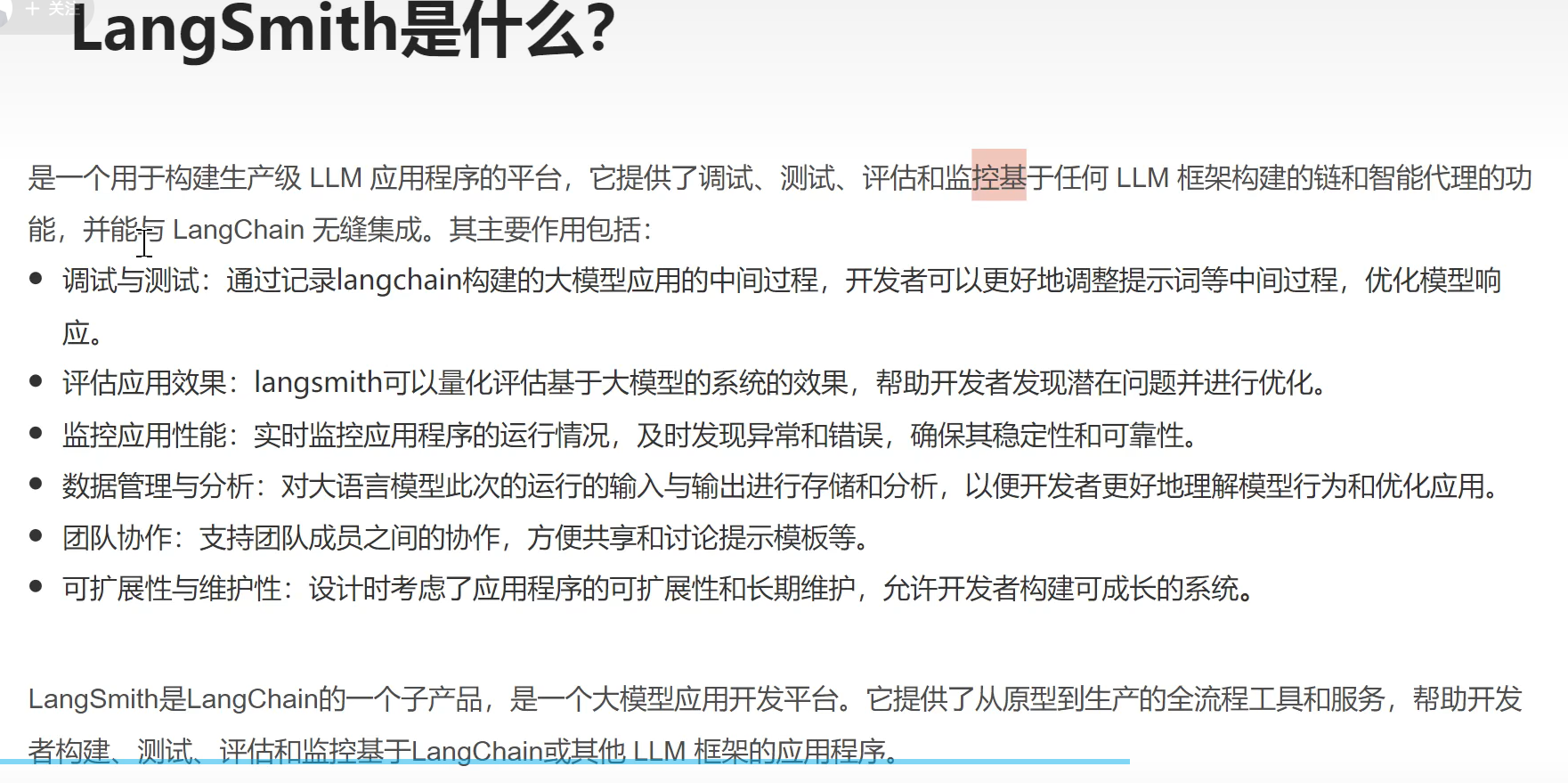
1、是什么
LangChain是一个用于开发自由语言模型驱动的应用程序的框架
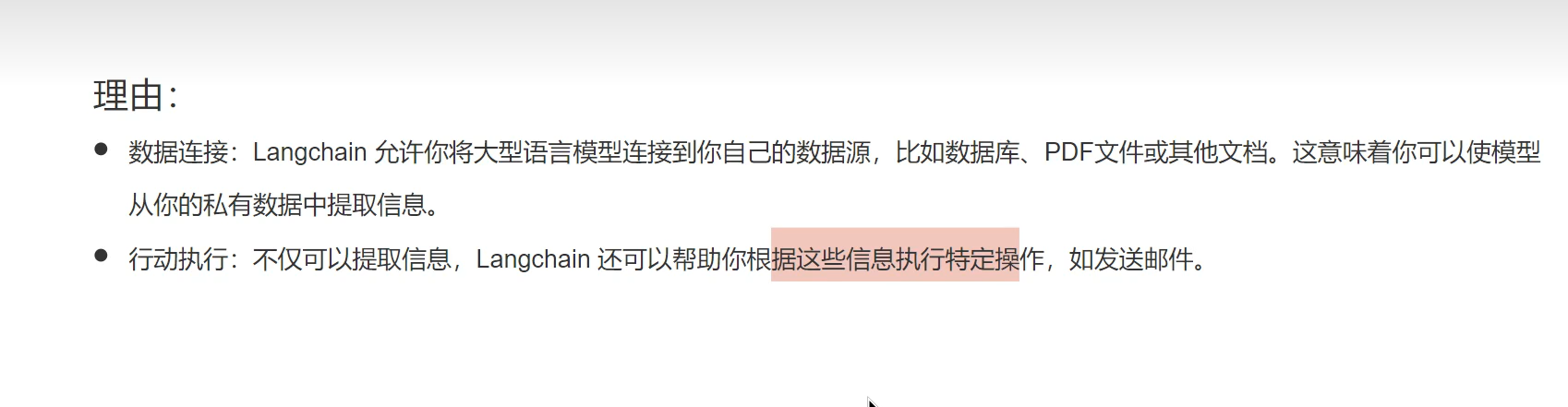
2、为什么使用
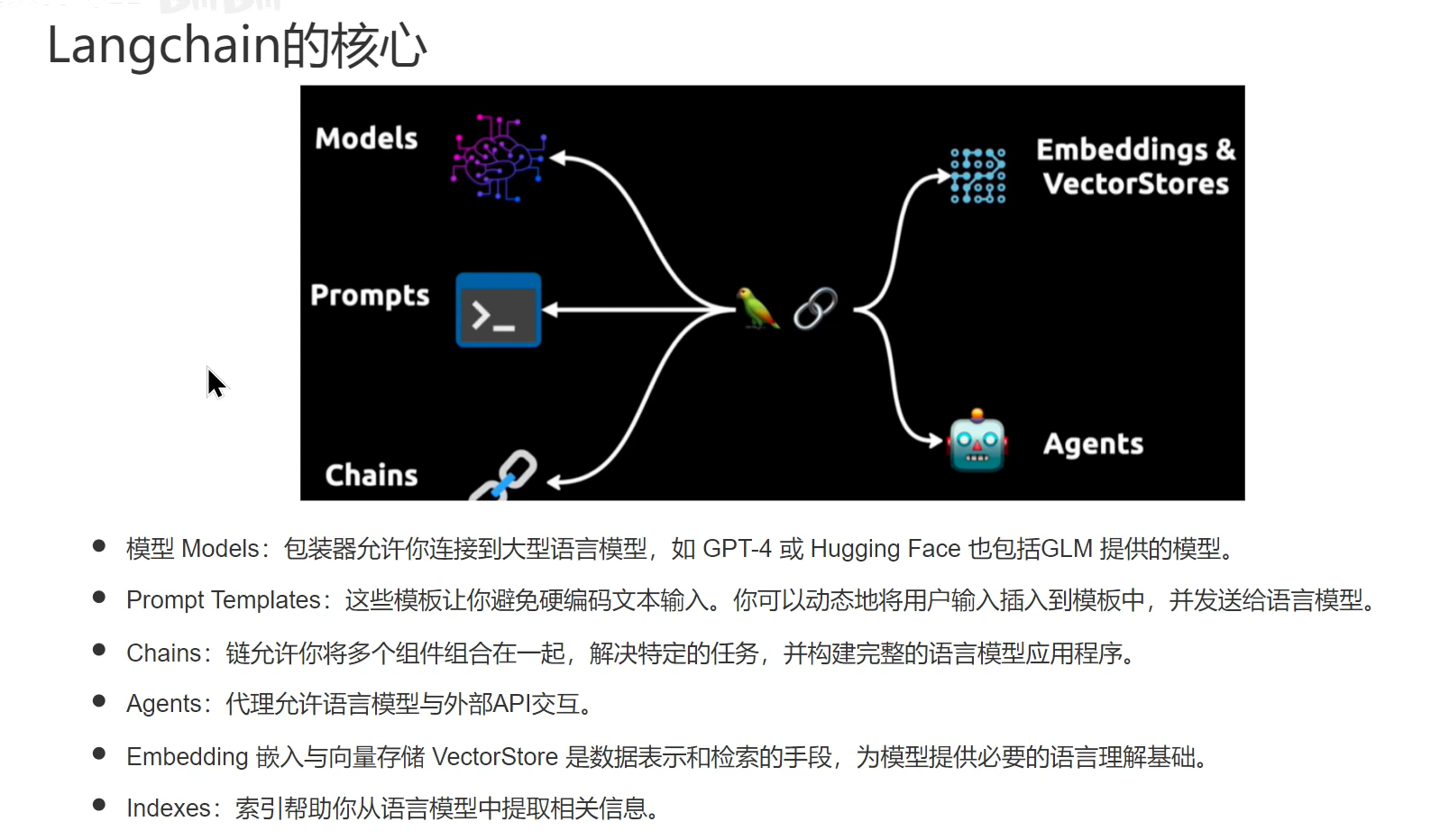
3、核心
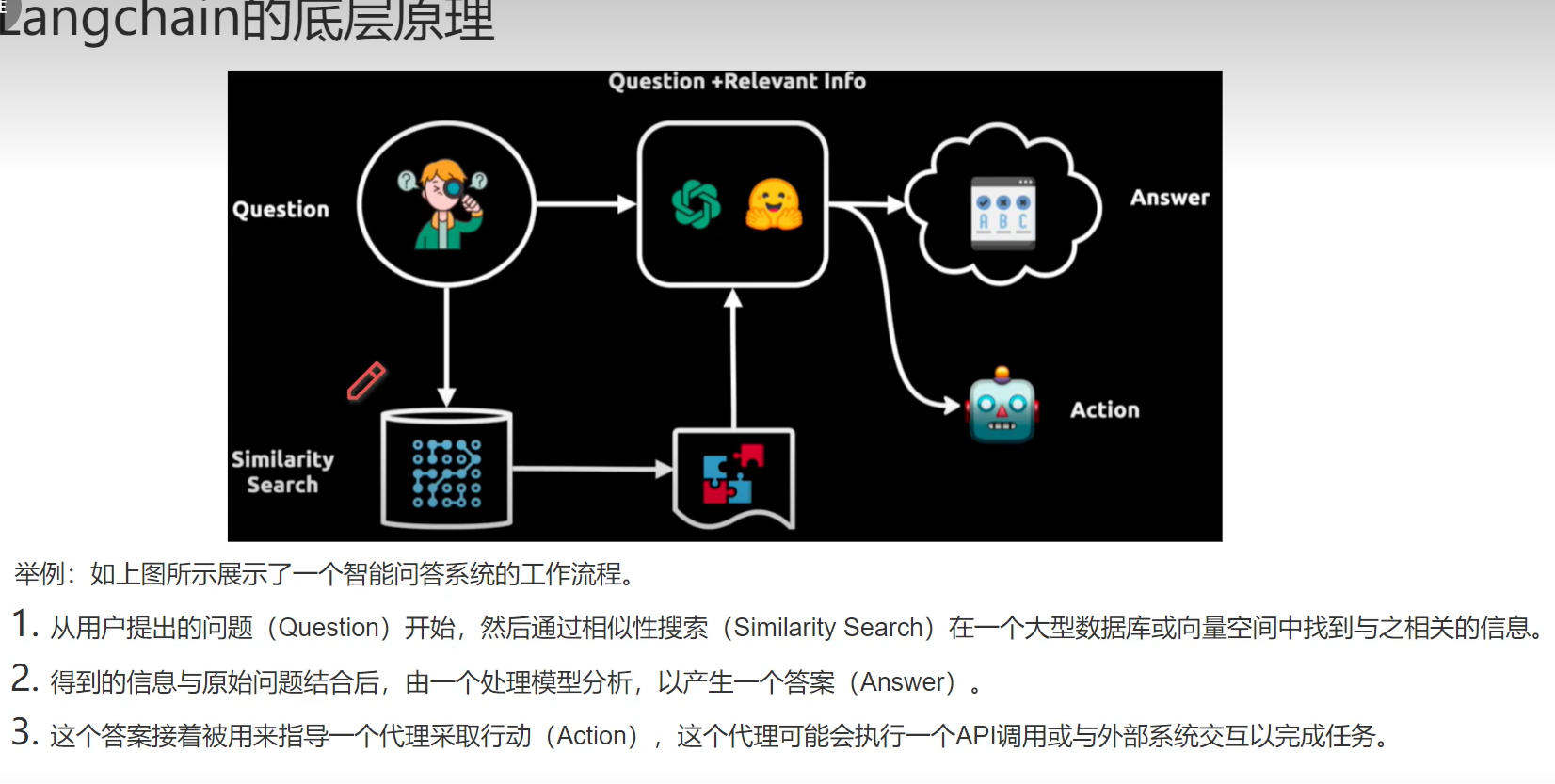
4、底层原理
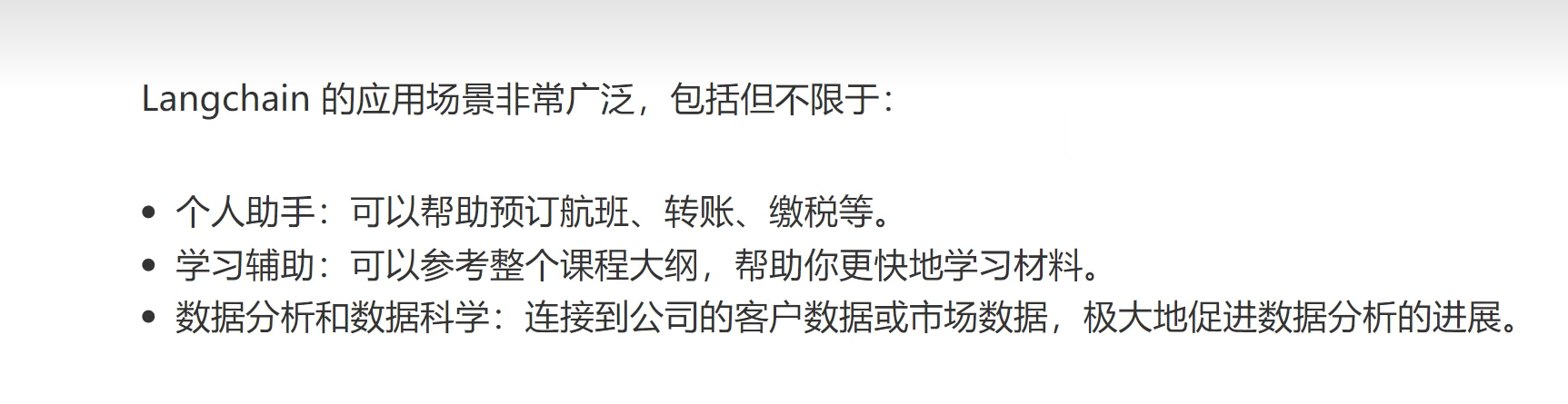
5、应用场景
三、简单的调用(包含LangServe)
1、安装
- pip install langchain
- # 如果使用openai模型就需要执行下面
- pip install langchain-openai
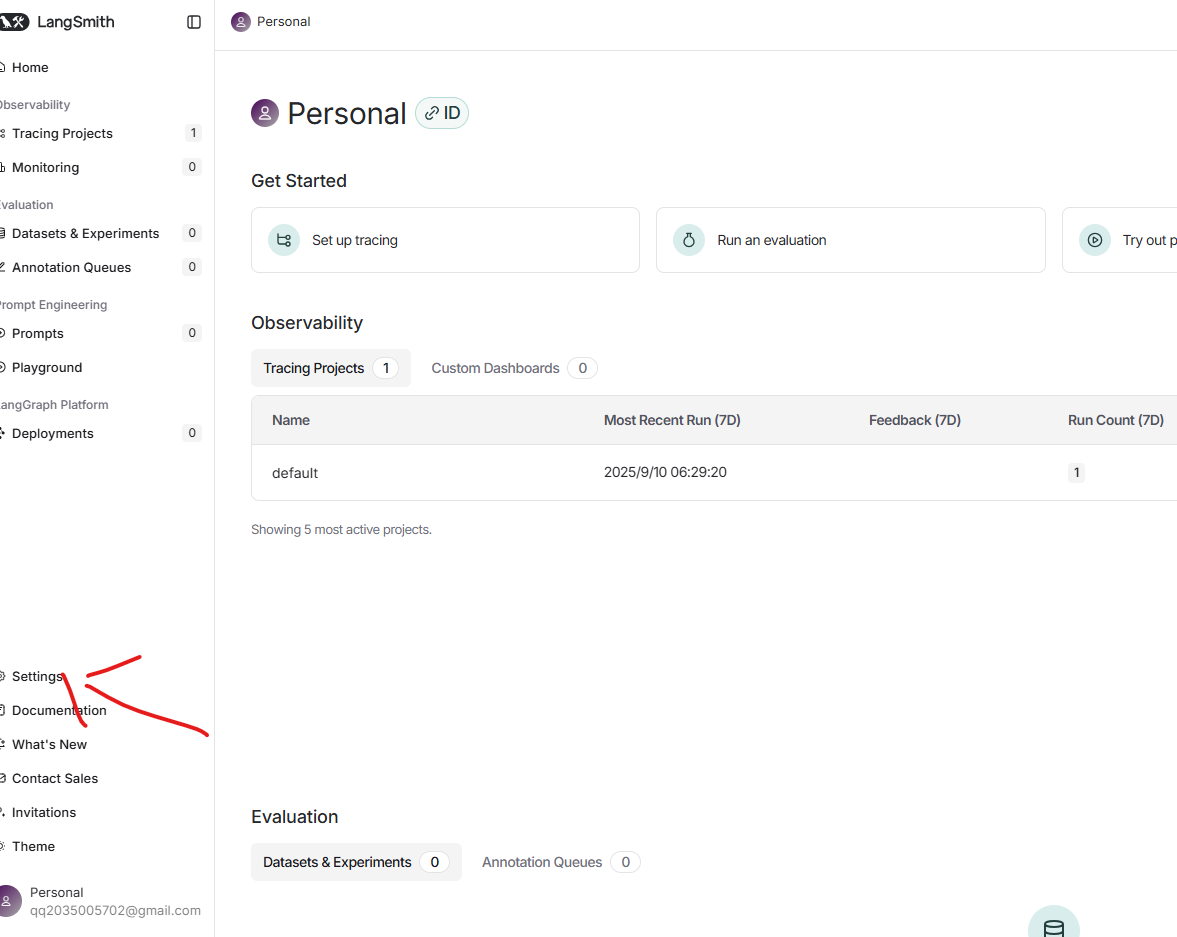
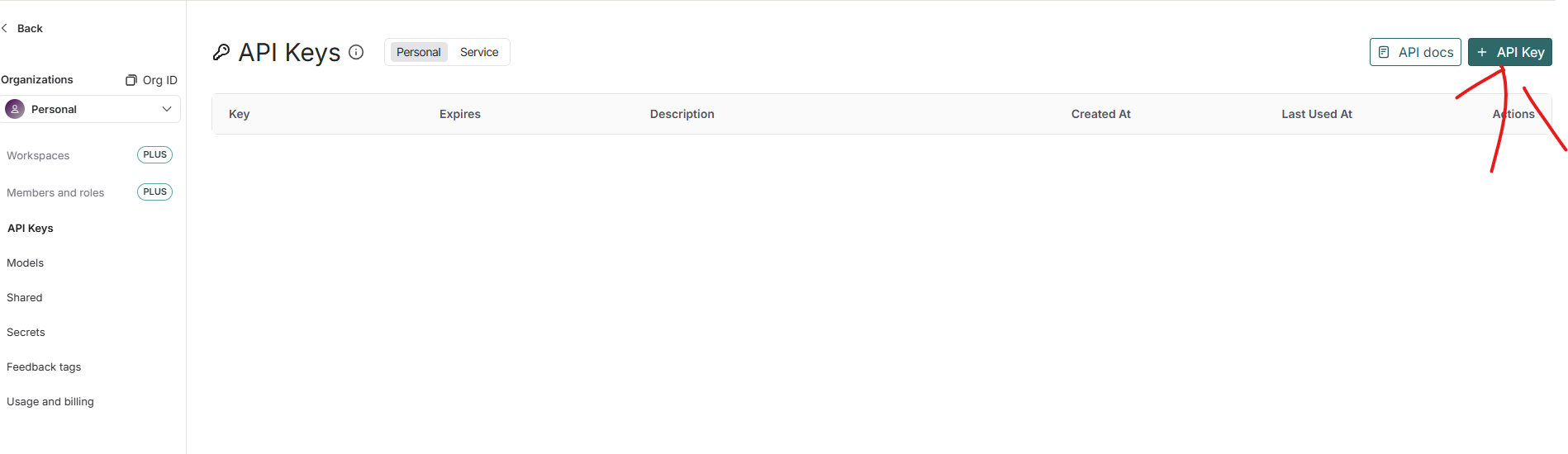
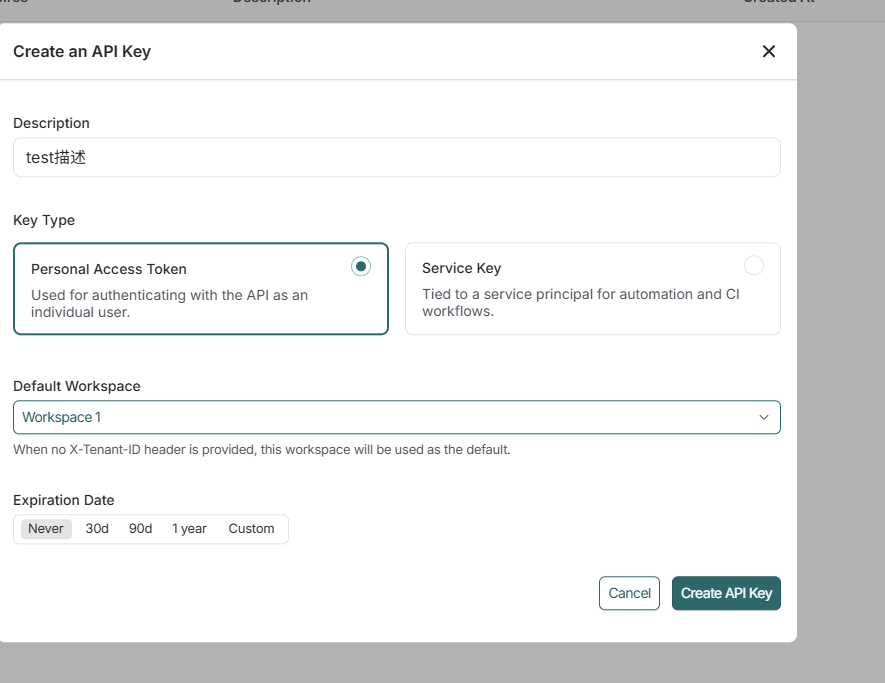
日志分析的工具:登录获取key
获取apiKey
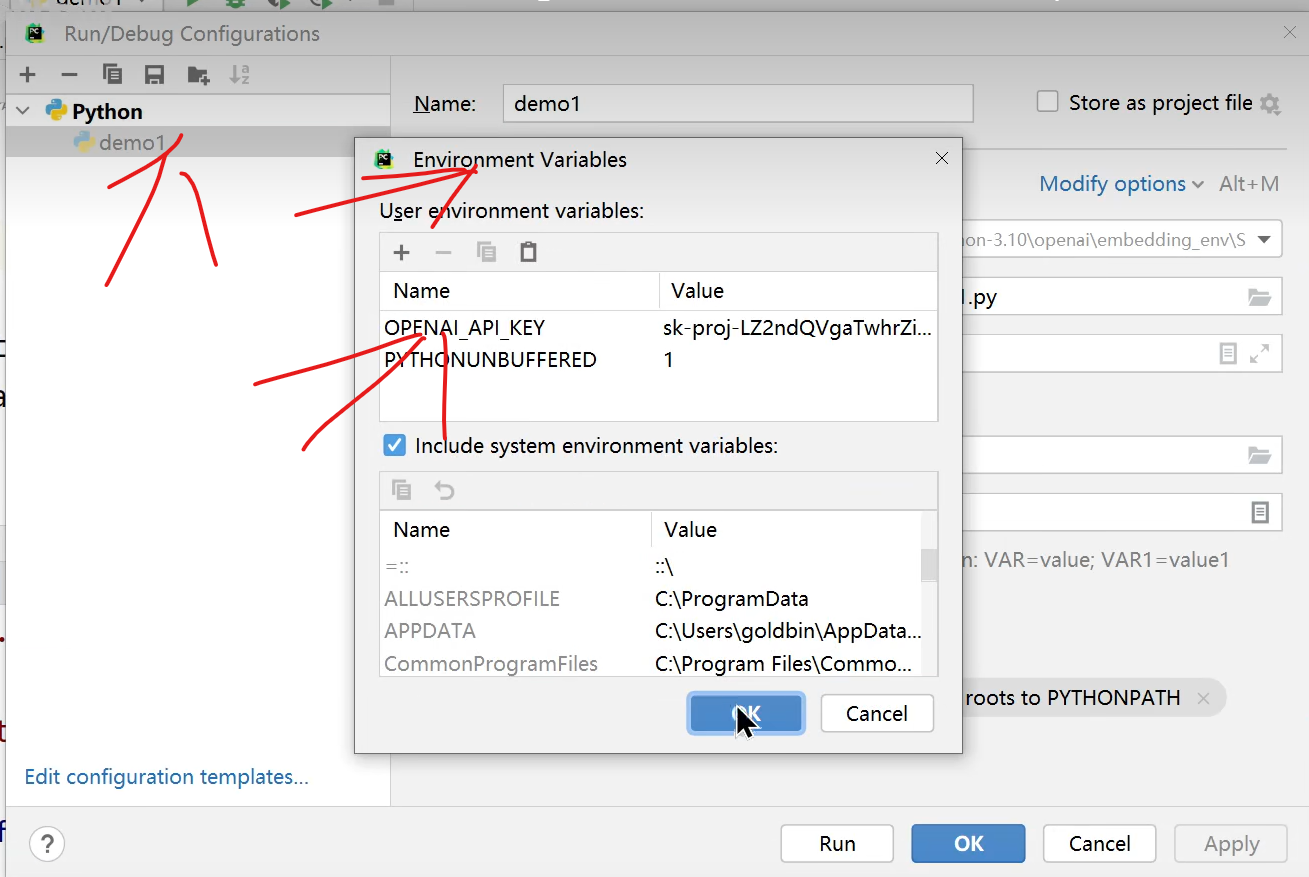
3、配置open的apikey
4、代码
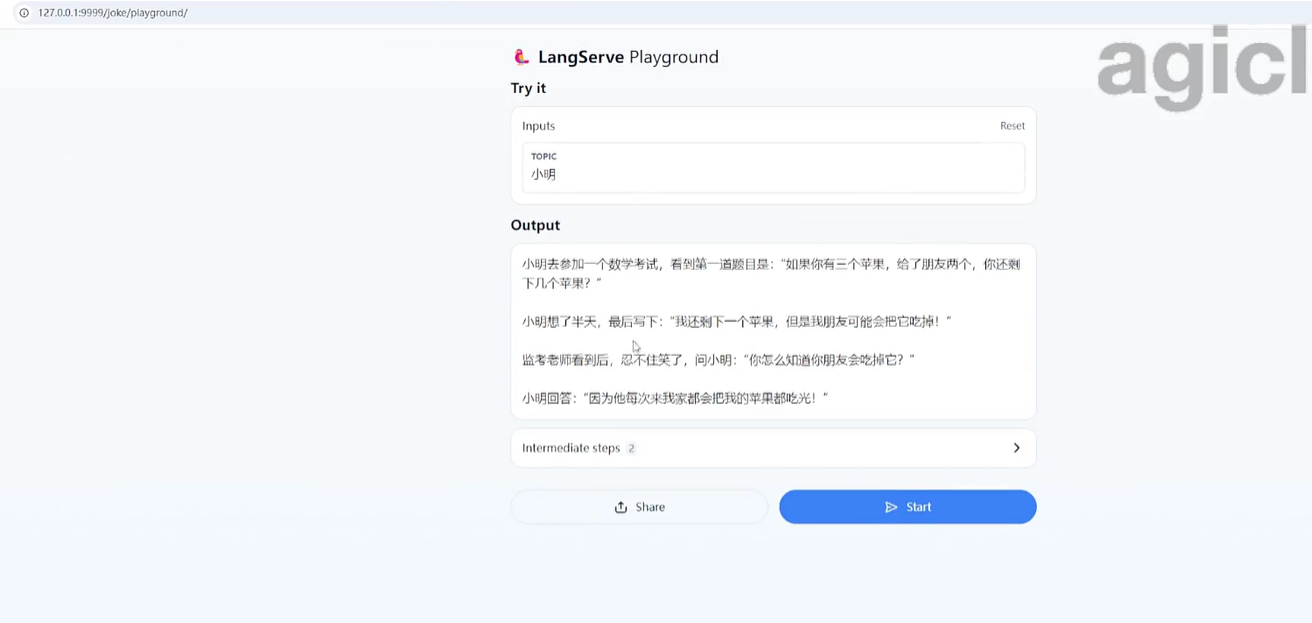
1、调试
localhost:8000/chainDemo/playground/
进行调试
2、代码
- import os
- from fastapi import FastAPI
- from langchain_core.messages import SystemMessage, HumanMessage
- from langchain_core.output_parsers import StrOutputParser
- from langchain_core.prompts import ChatPromptTemplate
- from langchain_openai import ChatOpenAI
- from langserve import add_routes
- # 代理设置
- os.environ['http_proxy']='127.0.0.1:7890'
- os.environ['https_proxy']='127.0.0.1:7890'# 是否代码追踪 不设置为true会默认使用v1 也可以不使用以下追踪
- os.environ["LANGCHAIN_TRACING_V2"]="true"# os.environ["LANGCHAIN_ENDPOINT"] = "https://api.smith.langchain.com"
- os.environ["LANGCHAIN_PROJECT"]="LangchainDemo"
- os.environ["LANGCHAIN_API_KEY"]='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'# 调用大语言模型# 创建模型
- model = ChatOpenAI(model='gpt-4-turbo')# 2、准备prompt
- msg =[
- SystemMessage(content='请将以下的内容翻译成意大利语'),# 系统指令
- HumanMessage(content='你好,请问你要去哪里?')# 普通用户]# 直接返回数据显示消耗的token等# result = model.invoke(msg)# print(result)# 简单的解析响应数据 只输出回复内容 不显示消耗的token等# 3、创建返回的数据解析器
- parser = StrOutputParser()# 只打印文本# print(parser.invoke(result))# 定义提示模板
- prompt_template = ChatPromptTemplate.from_messages([('system','请将下面的内容翻译成{language}'),('user',"{text}")])# 4、得到链
- chain = prompt_template | model | parser
- # 5、 直接使用chain来调用# print(chain.invoke(msg))print(chain.invoke({'language':'English','text':'我下午还有一节课,不能去打球了。'}))# 把我们的程序部署成服务# 创建fastAPI的应用
- app = FastAPI(title='我的Langchain服务', version='V1.0', description='使用Langchain翻译任何语句的服务器')
- add_routes(
- app,
- chain,
- path="/chainDemo",)if __name__ =="__main__":import uvicorn
- uvicorn.run(app, host="localhost", port=8000)
- from langserve import RemoteRunnable
- if __name__ =='__main__':
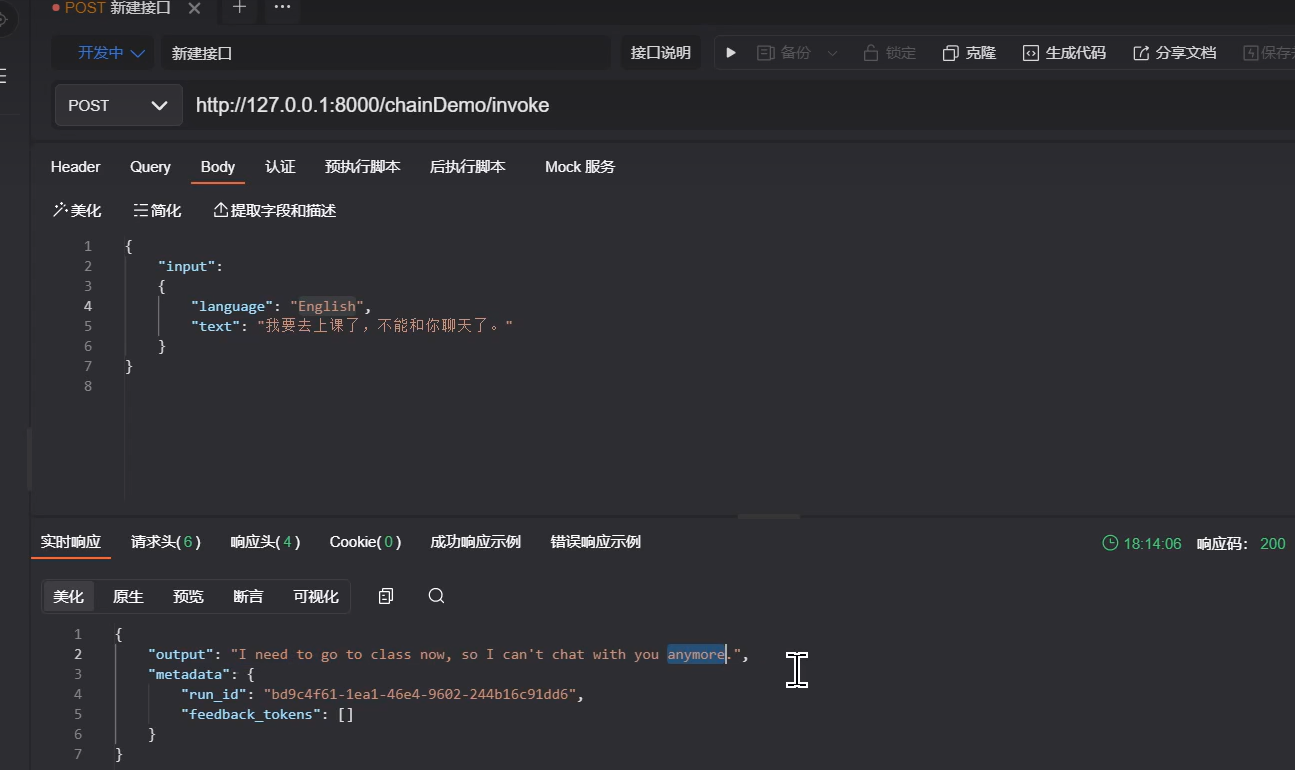
- client = RemoteRunnable('http://127.0.0.1:8000/chainDemo/')print(client.invoke({'language':'italian','text':'你好!'})
如果使用别的模型可以从一中py课件中替换别的模型进行pip和导入包,可以找ai去问
四、保存历史记录和流式输出
1、基于内存
第三轮为流式输出- import os
- from langchain_community.chat_message_histories import ChatMessageHistory
- from langchain_core.messages import HumanMessage
- from langchain_core.prompts import ChatPromptTemplate, MessagesPlaceholder
- from langchain_core.runnables import RunnableWithMessageHistory
- from langchain_openai import ChatOpenAI
- from langserve import add_routes
- os.environ['http_proxy']='127.0.0.1:7890'
- os.environ['https_proxy']='127.0.0.1:7890'
- os.environ["LANGCHAIN_TRACING_V2"]="true"
- os.environ["LANGCHAIN_PROJECT"]="LangchainDemo"
- os.environ["LANGCHAIN_API_KEY"]='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'# 聊天机器人案例# 创建模型
- model = ChatOpenAI(model='gpt-4-turbo')# 定义提示模板
- prompt_template = ChatPromptTemplate.from_messages([('system','你是一个乐于助人的助手。用{language}尽你所能回答所有问题。'),
- MessagesPlaceholder(variable_name='my_msg')])# 得到链
- chain = prompt_template | model
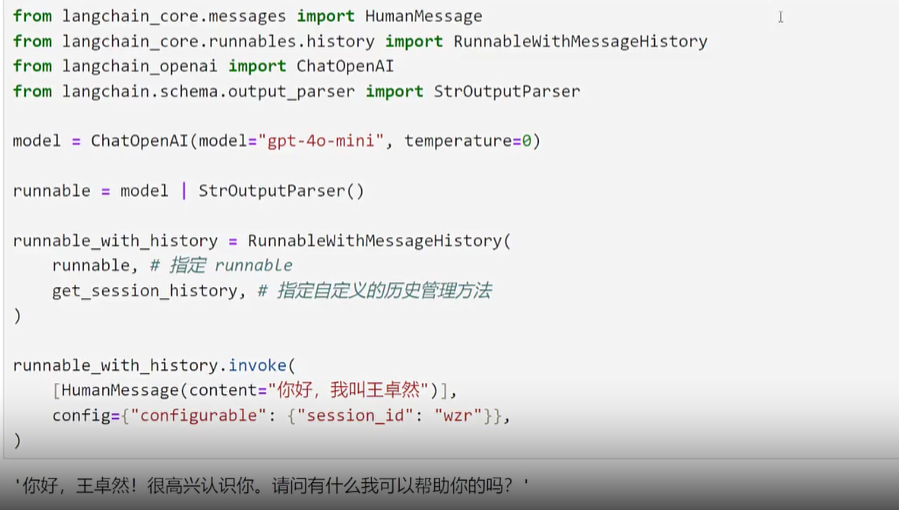
- # 保存聊天的历史记录
- store ={}# 所有用户的聊天记录都保存到store。 key: sessionId,value: 历史聊天记录对象# 此函数预期将接收一个session_id并返回一个消息历史记录对象。defget_session_history(session_id:str):if session_id notin store:
- store[session_id]= ChatMessageHistory()return store[session_id]
- do_message = RunnableWithMessageHistory(
- chain,
- get_session_history,
- input_messages_key='my_msg'# 每次聊天时候发送msg的key)
- config ={'configurable':{'session_id':'zs1234'}}# 给当前会话定义一个sessionId# 第一轮
- resp1 = do_message.invoke({'my_msg':[HumanMessage(content='你好啊! 我是LaoXiao')],'language':'中文'},
- config=config
- )print(resp1.content)# 第二轮
- resp2 = do_message.invoke({'my_msg':[HumanMessage(content='请问:我的名字是什么?')],'language':'中文'},
- config=config
- )print(resp2.content)# 第3轮: 返回的数据是流式的
- config ={'configurable':{'session_id':'lis2323'}}# 给当前会话定义一个sessionIdfor resp in do_message.stream({'my_msg':[HumanMessage(content='请给我讲一个笑话?')],'language':'English'},
- config=config):# 每一次resp都是一个tokenprint(resp.content, end='-')
- import os
- from pymongo import MongoClient
- from langchain_community.chat_message_histories import ChatMessageHistory
- from langchain_core.messages import HumanMessage
- from langchain_core.prompts import ChatPromptTemplate, MessagesPlaceholder
- from langchain_core.runnables import RunnableWithMessageHistory
- from langchain_openai import ChatOpenAI
- # ---------- 环境变量 ----------
- os.environ['http_proxy']='127.0.0.1:7890'
- os.environ['https_proxy']='127.0.0.1:7890'
- os.environ["LANGCHAIN_TRACING_V2"]="true"
- os.environ["LANGCHAIN_PROJECT"]="LangchainDemo"
- os.environ["LANGCHAIN_API_KEY"]='你的API_KEY'# ---------- MongoDB 配置 ----------
- client = MongoClient('mongodb://localhost:27017')
- db = client['chat_db']
- collection = db['chat_history']defsave_history_to_db(session_id, history: ChatMessageHistory):
- messages =[{'role': m.type,'content': m.content}for m in history.messages]
- collection.update_one({'session_id': session_id},{'$set':{'messages': messages}},
- upsert=True)defload_history_from_db(session_id)-> ChatMessageHistory:
- doc = collection.find_one({'session_id': session_id})
- hist = ChatMessageHistory()if doc:for m in doc['messages']:if m['role']=='human':
- hist.add_user_message(m['content'])else:
- hist.add_ai_message(m['content'])return hist
- # ---------- 聊天机器人初始化 ----------
- model = ChatOpenAI(model='gpt-4-turbo')
- prompt_template = ChatPromptTemplate.from_messages([('system','你是一个乐于助人的助手。用{language}尽你所能回答所有问题。'),
- MessagesPlaceholder(variable_name='my_msg')])
- chain = prompt_template | model
- # ---------- 带持久化的 Runnable ----------
- store ={}# 内存缓存defget_session_history(session_id:str):if session_id notin store:
- store[session_id]= load_history_from_db(session_id)return store[session_id]classPersistedRunnableWithMessageHistory(RunnableWithMessageHistory):definvoke(self,input, config=None):
- result =super().invoke(input, config=config)# 每次调用完成后自动保存
- session_id = config['configurable']['session_id']
- save_history_to_db(session_id, store[session_id])return result
- defstream(self,input, config=None):for token insuper().stream(input, config=config):yield token
- # 流结束后保存历史
- session_id = config['configurable']['session_id']
- save_history_to_db(session_id, store[session_id])
- do_message = PersistedRunnableWithMessageHistory(
- chain,
- get_session_history,
- input_messages_key='my_msg')# ---------- 测试 ----------
- config ={'configurable':{'session_id':'user123'}}# 第一轮
- resp1 = do_message.invoke({'my_msg':[HumanMessage(content='你好,我是LaoXiao')],'language':'中文'},
- config=config
- )print(resp1.content)# 第二轮
- resp2 = do_message.invoke({'my_msg':[HumanMessage(content='你还记得我是谁吗?')],'language':'中文'},
- config=config
- )print(resp2.content)# 第三轮,流式输出for resp in do_message.stream({'my_msg':[HumanMessage(content='讲个笑话给我听吧')],'language':'中文'},
- config=config):print(resp.content, end='')
五、构建代理(工具的使用)
1、 代理+工具
- import os
- from langchain_community.tools.tavily_search import TavilySearchResults
- from langchain_core.messages import HumanMessage
- from langchain_openai import ChatOpenAI, OpenAIEmbeddings
- from langgraph.prebuilt import chat_agent_executor
- from langserve import add_routes
- os.environ['http_proxy']='127.0.0.1:7890'
- os.environ['https_proxy']='127.0.0.1:7890'
- os.environ["LANGCHAIN_TRACING_V2"]="true"
- os.environ["LANGCHAIN_PROJECT"]="LangchainDemo"
- os.environ["LANGCHAIN_API_KEY"]='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'# 工具的key
- os.environ["TAVILY_API_KEY"]='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'# 聊天机器人案例# 创建模型
- model = ChatOpenAI(model='gpt-4-turbo')# 没有任何代理的情况下# result = model.invoke([HumanMessage(content='北京天气怎么样?')])# print(result)# LangChain内置了一个工具,可以轻松地使用Tavily搜索引擎作为工具。
- search = TavilySearchResults(max_results=2)# max_results: 只返回两个结果# print(search.invoke('北京的天气怎么样?'))# 让模型绑定工具
- tools =[search]# model_with_tools = model.bind_tools(tools)# 模型可以自动推理:是否需要调用工具去完成用户的答案 但是没有真正使用工具必须使用代理才能调用# resp = model_with_tools.invoke([HumanMessage(content='中国的首都是哪个城市?')])## print(f'Model_Result_Content: {resp.content}')# print(f'Tools_Result_Content: {resp.tool_calls}')## resp2 = model_with_tools.invoke([HumanMessage(content='北京天气怎么样?')])## print(f'Model_Result_Content: {resp2.content}')# print(f'Tools_Result_Content: {resp2.tool_calls}')# 创建代理
- agent_executor = chat_agent_executor.create_tool_calling_executor(model, tools)# 其实也不需要给key,这里给key是为了后面取值方便
- resp = agent_executor.invoke({'messages':[HumanMessage(content='中国的首都是哪个城市?')]})print(resp['messages'])
- resp2 = agent_executor.invoke({'messages':[HumanMessage(content='北京天气怎么样?')]})print(resp2['messages'])print(resp2['messages'][2].content)
1. 方式一
- from langchain_core.tools import tool
- # 自定义一个工具:比如计算字符串的长度@tooldefget_text_length(text:str)->int:"""返回输入文本的长度"""returnlen(text)# 使用方法print(get_text_length.invoke("你好世界"))# 输出 4
- from langchain_openai import ChatOpenAI
- from langgraph.prebuilt import chat_agent_executor
- model = ChatOpenAI(model="gpt-4-turbo")# 工具列表
- tools =[get_text_length]# 创建代理
- agent_executor = chat_agent_executor.create_tool_calling_executor(model, tools)
- resp = agent_executor.invoke({"messages":[{"role":"user","content":"请帮我算一下 'LangChain' 有几个字符?"}]})print(resp["messages"][-1].content)
- from langchain_core.tools import BaseTool
- classReverseStringTool(BaseTool):
- name ="reverse_string"
- description ="把输入的字符串反转"def_run(self, text:str)->str:return text[::-1]# 创建工具实例
- reverse_tool = ReverseStringTool()# 测试print(reverse_tool.invoke("LangChain"))# 输出 "niahCgnaL"
六、构建向量数据库和检索器(RAG)
输出的条数限制等情况,其实不太适合作为查某个字出现多少条的- import os
- from langchain_chroma import Chroma
- from langchain_community.chat_message_histories import ChatMessageHistory
- from langchain_core.documents import Document
- from langchain_core.messages import HumanMessage
- from langchain_core.prompts import ChatPromptTemplate, MessagesPlaceholder
- from langchain_core.runnables import RunnableWithMessageHistory, RunnableLambda, RunnablePassthrough
- from langchain_openai import ChatOpenAI, OpenAIEmbeddings
- from langserve import add_routes
- os.environ['http_proxy']='127.0.0.1:7890'
- os.environ['https_proxy']='127.0.0.1:7890'
- os.environ["LANGCHAIN_TRACING_V2"]="true"
- os.environ["LANGCHAIN_PROJECT"]="LangchainDemo"
- os.environ["LANGCHAIN_API_KEY"]='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'# 聊天机器人案例# 创建模型
- model = ChatOpenAI(model='gpt-4-turbo')# 准备测试数据 ,假设我们提供的文档数据如下:
- documents =[
- Document(
- page_content="狗是伟大的伴侣,以其忠诚和友好而闻名。",
- metadata={"source":"哺乳动物宠物文档"},),
- Document(
- page_content="猫是独立的宠物,通常喜欢自己的空间。",
- metadata={"source":"哺乳动物宠物文档"},),
- Document(
- page_content="金鱼是初学者的流行宠物,需要相对简单的护理。",
- metadata={"source":"鱼类宠物文档"},),
- Document(
- page_content="鹦鹉是聪明的鸟类,能够模仿人类的语言。",
- metadata={"source":"鸟类宠物文档"},),
- Document(
- page_content="兔子是社交动物,需要足够的空间跳跃。",
- metadata={"source":"哺乳动物宠物文档"},),]# 实例化一个向量数空间
- vector_store = Chroma.from_documents(documents, embedding=OpenAIEmbeddings())# 相似度的查询: 返回相似的分数, 分数越低相似度越高# print(vector_store.similarity_search_with_score('咖啡猫'))# 检索器: bind(k=1) 返回相似度最高的第一个
- retriever = RunnableLambda(vector_store.similarity_search).bind(k=1)# print(retriever.batch(['咖啡猫', '鲨鱼']))# 提示模板
- message ="""
- 使用提供的上下文仅回答这个问题:
- {question}
- 上下文:
- {context}
- """
- prompt_temp = ChatPromptTemplate.from_messages([('human', message)])# RunnablePassthrough允许我们将用户的问题之后再传递给prompt和model。
- chain ={'question': RunnablePassthrough(),'context': retriever}| prompt_temp | model
- resp = chain.invoke('请介绍一下猫?')print(resp.content)
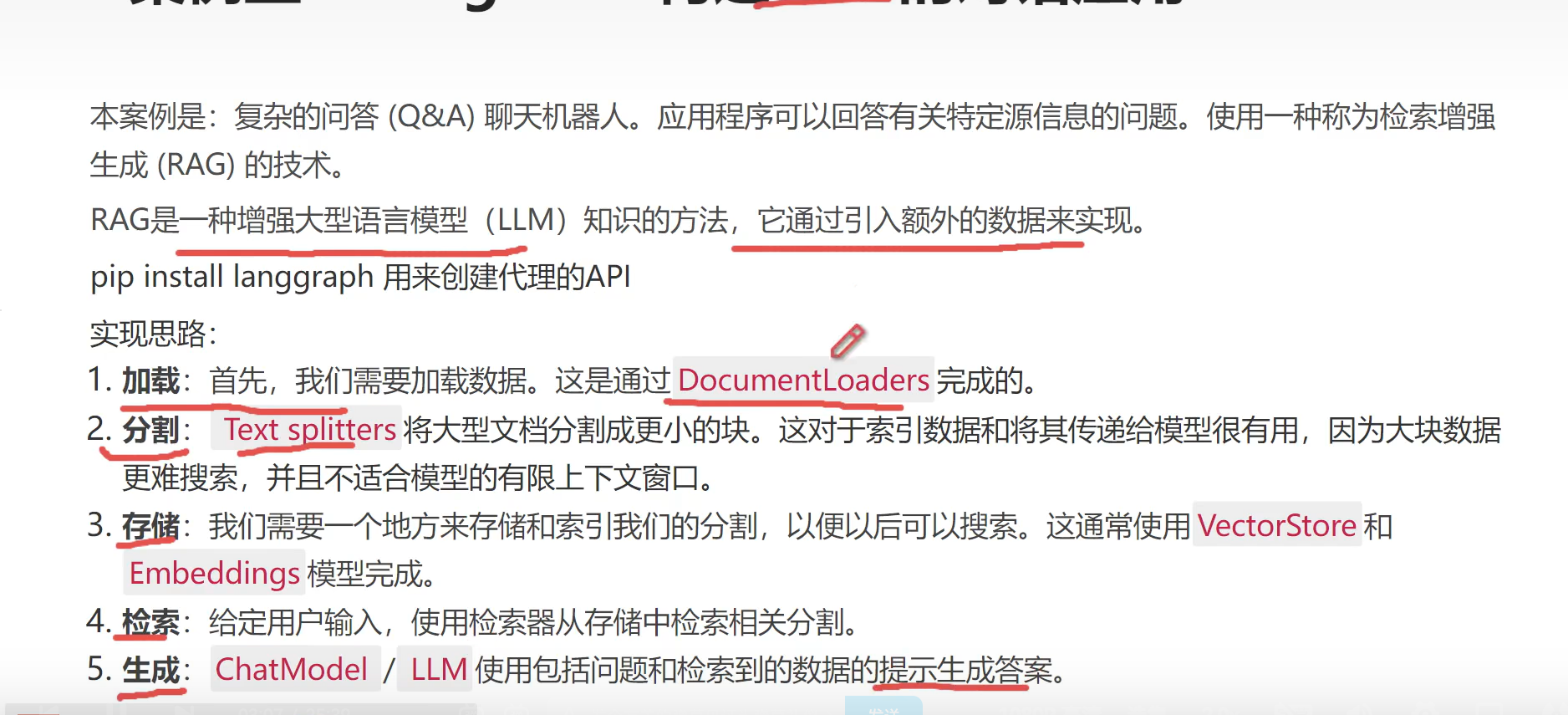
1、思路
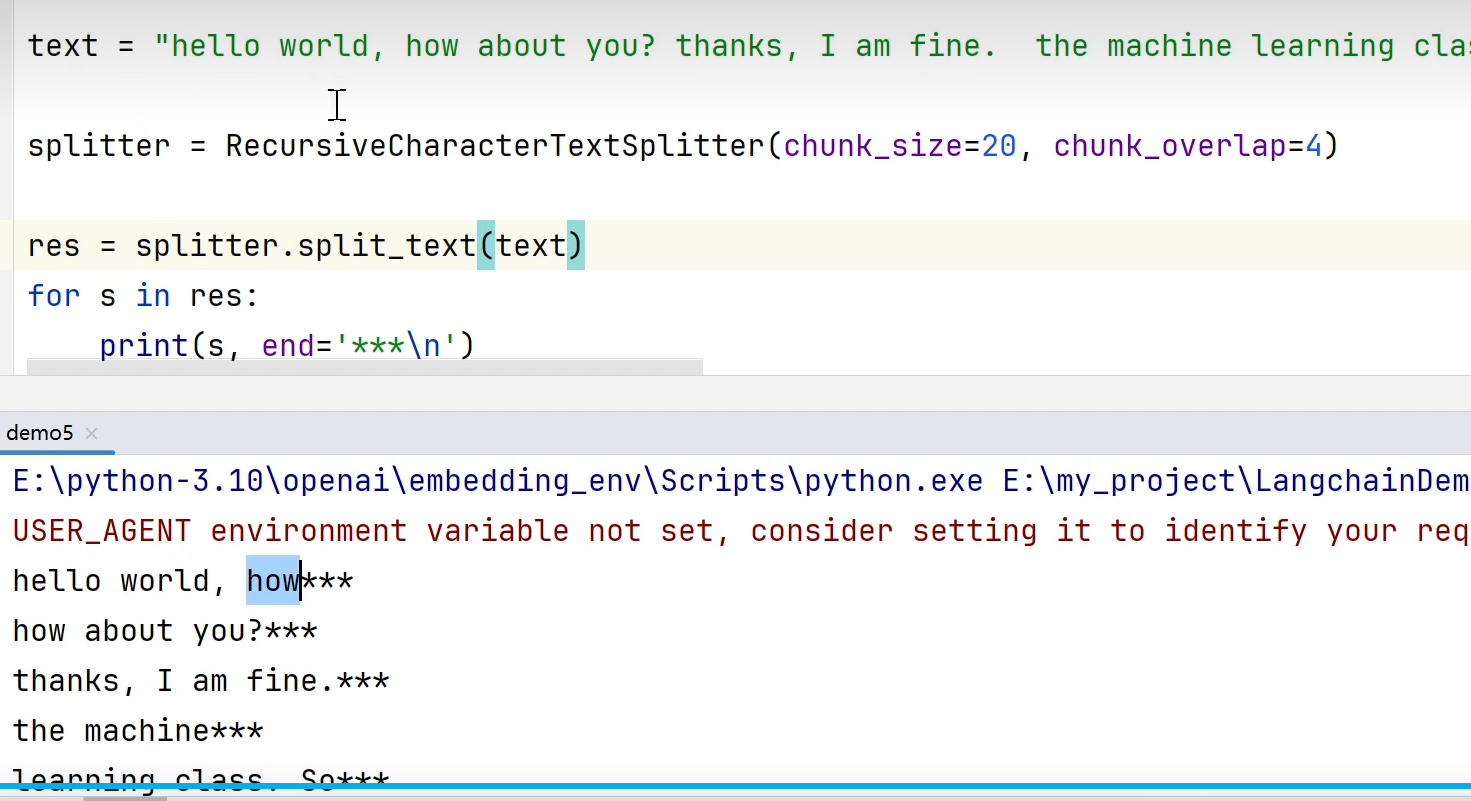
2、切割
一句话几个字符,后面是重复的
3、代码(RAG中检索库不能理解上下文中连贯的内容意思解决方案)
- import os
- import bs4
- from langchain.chains.combine_documents import create_stuff_documents_chain
- from langchain.chains.history_aware_retriever import create_history_aware_retriever
- from langchain.chains.retrieval import create_retrieval_chain
- from langchain_chroma import Chroma
- from langchain_community.document_loaders import WebBaseLoader
- from langchain_core.prompts import ChatPromptTemplate, MessagesPlaceholder
- from langchain_core.runnables import RunnableWithMessageHistory
- from langchain_text_splitters import RecursiveCharacterTextSplitter
- from langchain_community.chat_message_histories import ChatMessageHistory
- from langchain_openai import ChatOpenAI, OpenAIEmbeddings
- os.environ['http_proxy']='127.0.0.1:7890'
- os.environ['https_proxy']='127.0.0.1:7890'
- os.environ["LANGCHAIN_TRACING_V2"]="true"
- os.environ["LANGCHAIN_PROJECT"]="LangchainDemo"
- os.environ["LANGCHAIN_API_KEY"]='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'# os.environ["TAVILY_API_KEY"] = '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'# 聊天机器人案例# 创建模型
- model = ChatOpenAI(model='gpt-4-turbo')# 1、加载数据: 一篇博客内容数据
- loader = WebBaseLoader(
- web_paths=['https://lilianweng.github.io/posts/2023-06-23-agent/'],
- bs_kwargs=dict(
- parse_only=bs4.SoupStrainer(class_=('post-header','post-title','post-content'))))
- docs = loader.load()# print(len(docs))# print(docs)# 2、大文本的切割# text = "hello world, how about you? thanks, I am fine. the machine learning class. So what I wanna do today is just spend a little time going over the logistics of the class, and then we'll start to talk a bit about machine learning"
- splitter = RecursiveCharacterTextSplitter(chunk_size=1000, chunk_overlap=200)# 一篇1000个字符的文本进行切割,重复200字符
- splits = splitter.split_documents(docs)# 2、存储 落到库里是向量+文本+元信息"""
- 例如
- {
- "id": "uuid-123456", // 唯一ID
- "embedding": [0.0123, -0.98, ...], // 向量,高维浮点数组
- "document": "这是原始的文本片段", // 你切分后的文本
- "metadata": { // 附带的元信息
- "source": "example.txt",
- "page": 12,
- "chunk": 1
- }
- }
- """
- vectorstore = Chroma.from_documents(documents=splits, embedding=OpenAIEmbeddings())# 3、检索器
- retriever = vectorstore.as_retriever()# 整合# 创建一个问题的模板
- system_prompt ="""You are an assistant for question-answering tasks.
- Use the following pieces of retrieved context to answer
- the question. If you don't know the answer, say that you
- don't know. Use three sentences maximum and keep the answer concise.\n
- {context}
- """
- prompt = ChatPromptTemplate.from_messages(# 提问和回答的 历史记录 模板[("system", system_prompt),
- MessagesPlaceholder("chat_history"),#第一个输出报错就注释掉这个("human","{input}"),])# 得到chain
- chain1 = create_stuff_documents_chain(model, prompt)# chain2 = create_retrieval_chain(retriever, chain1)# resp = chain2.invoke({'input': "What is Task Decomposition?"})## print(resp['answer'])'''
- 注意:
- 一般情况下,我们构建的链(chain)直接使用输入问答记录来关联上下文。但在此案例中,查询检索器也需要对话上下文才能被理解。
- 解决办法:
- 添加一个子链(chain),它采用最新用户问题和聊天历史,并在它引用历史信息中的任何信息时重新表述问题。这可以被简单地认为是构建一个新的“历史感知”检索器。
- 这个子链的目的:让检索过程融入了对话的上下文。
- '''# 创建一个子链# 子链的提示模板# 帮助检索器理解上下文的
- contextualize_q_system_prompt ="""Given a chat history and the latest user question
- which might reference context in the chat history,
- formulate a standalone question which can be understood
- without the chat history. Do NOT answer the question,
- just reformulate it if needed and otherwise return it as is."""
- retriever_history_temp = ChatPromptTemplate.from_messages([('system', contextualize_q_system_prompt),
- MessagesPlaceholder('chat_history'),("human","{input}"),])# 创建一个子链
- history_chain = create_history_aware_retriever(model, retriever, retriever_history_temp)# 保持问答的历史记录
- store ={}defget_session_history(session_id:str):if session_id notin store:
- store[session_id]= ChatMessageHistory()return store[session_id]# 创建父链chain: 把前两个链整合
- chain = create_retrieval_chain(history_chain, chain1)
- result_chain = RunnableWithMessageHistory(
- chain,
- get_session_history,
- input_messages_key='input',
- history_messages_key='chat_history',
- output_messages_key='answer'# 输出的键定义)# 第一轮对话
- resp1 = result_chain.invoke({'input':'What is Task Decomposition?'},
- config={'configurable':{'session_id':'zs123456'}})print(resp1['answer'])# 第二轮对话
- resp2 = result_chain.invoke({'input':'What are common ways of doing it?'},
- config={'configurable':{'session_id':'ls123456'}})print(resp2['answer'])
1、 链接数据库(SQLAlchemy)
简单介绍地址
2、 代码1 gpt4不能用
- import os
- from operator import itemgetter
- import bs4
- from langchain.chains.combine_documents import create_stuff_documents_chain
- from langchain.chains.history_aware_retriever import create_history_aware_retriever
- from langchain.chains.retrieval import create_retrieval_chain
- from langchain.chains.sql_database.query import create_sql_query_chain
- from langchain_chroma import Chroma
- from langchain_community.document_loaders import WebBaseLoader
- from langchain_community.tools import QuerySQLDataBaseTool
- from langchain_community.utilities import SQLDatabase
- from langchain_core.output_parsers import StrOutputParser
- from langchain_core.prompts import ChatPromptTemplate, MessagesPlaceholder, PromptTemplate
- from langchain_core.runnables import RunnableWithMessageHistory, RunnablePassthrough
- from langchain_text_splitters import RecursiveCharacterTextSplitter
- from langchain_community.chat_message_histories import ChatMessageHistory
- from langchain_openai import ChatOpenAI, OpenAIEmbeddings
- os.environ['http_proxy']='127.0.0.1:7890'
- os.environ['https_proxy']='127.0.0.1:7890'
- os.environ["LANGCHAIN_TRACING_V2"]="true"
- os.environ["LANGCHAIN_PROJECT"]="LangchainDemo"
- os.environ["LANGCHAIN_API_KEY"]='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'# os.environ["TAVILY_API_KEY"] = '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'# 聊天机器人案例# 创建模型
- model = ChatOpenAI(model='gpt-3.5-turbo')# sqlalchemy 初始化MySQL数据库的连接
- HOSTNAME ='127.0.0.1'
- PORT ='3306'
- DATABASE ='test_db8'
- USERNAME ='root'
- PASSWORD ='123123'# mysqlclient驱动URL
- MYSQL_URI ='mysql+mysqldb://{}:{}@{}:{}/{}?charset=utf8mb4'.format(USERNAME, PASSWORD, HOSTNAME, PORT, DATABASE)
- db = SQLDatabase.from_uri(MYSQL_URI)# 测试连接是否成功# print(db.get_usable_table_names())# print(db.run('select * from t_emp limit 10;'))# 直接使用大模型和数据库整合, 只能根据你的问题生成SQL# 初始化生成SQL的chain
- test_chain = create_sql_query_chain(model, db)# resp = test_chain.invoke({'question': '请问:员工表中有多少条数据?'})# print(resp) # 输出:SELECT COUNT(*) FROM t_emp;
- answer_prompt = PromptTemplate.from_template("""给定以下用户问题、SQL语句和SQL执行后的结果,回答用户问题。
- Question: {question}
- SQL Query: {query}
- SQL Result: {result}
- 回答: """)# 创建一个执行sql语句的工具
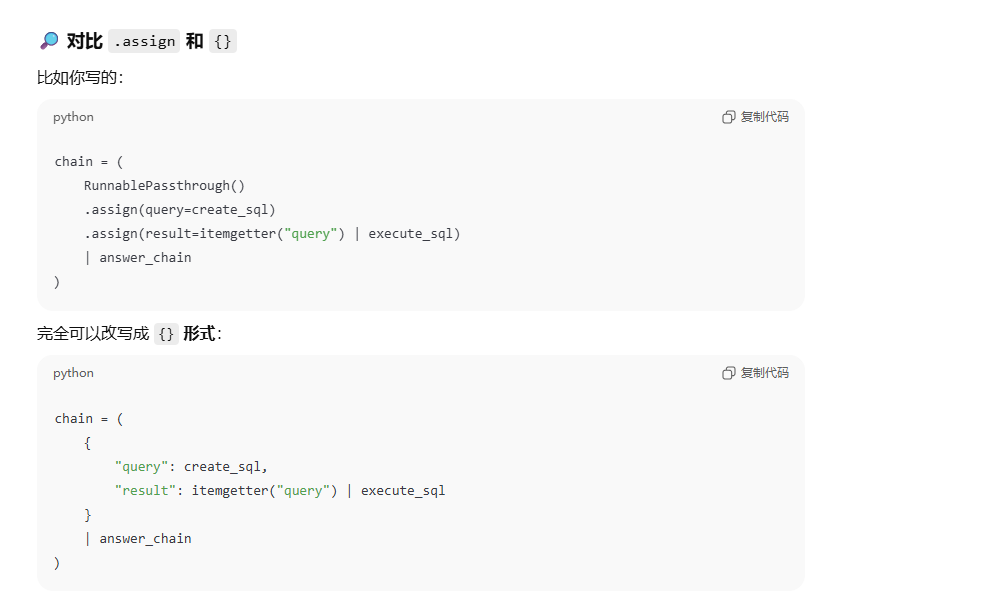
- execute_sql_tool = QuerySQLDataBaseTool(db=db)# itemgetter('query')是取值的方法 ,然后结果给这个# data = {'query': 'hello', 'count': 10}# get_query = itemgetter('query')# print(get_query(data)) # 输出: hello# 1、RunnablePassthrough.assign(query=test_chain)生成SQL# 2、.assign(result=itemgetter('query') | execute_sql_tool)其中itemgetter('query') | execute_sql_tool是先获取sql交给工具执行,然后赋值给result# 前面的query和result是放入到消息模板中answer_prompt
- chain =(RunnablePassthrough.assign(query=test_chain).assign(result=itemgetter('query')| execute_sql_tool)| answer_prompt
- | model
- | StrOutputParser())
- rep = chain.invoke(input={'question':'请问:员工表中有多少条数据?'})print(rep)
- import os
- from langchain_community.agent_toolkits import SQLDatabaseToolkit
- from langchain_community.utilities import SQLDatabase
- from langchain_core.messages import SystemMessage, HumanMessage
- from langchain_openai import ChatOpenAI, OpenAIEmbeddings
- from langgraph.prebuilt import chat_agent_executor
- os.environ['http_proxy']='127.0.0.1:7890'
- os.environ['https_proxy']='127.0.0.1:7890'
- os.environ["LANGCHAIN_TRACING_V2"]="true"
- os.environ["LANGCHAIN_PROJECT"]="LangchainDemo"
- os.environ["LANGCHAIN_API_KEY"]='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'# os.environ["TAVILY_API_KEY"] = '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'# 聊天机器人案例# 创建模型
- model = ChatOpenAI(model='gpt-4-turbo')# sqlalchemy 初始化MySQL数据库的连接
- HOSTNAME ='127.0.0.1'
- PORT ='3306'
- DATABASE ='test_db8'
- USERNAME ='root'
- PASSWORD ='123123'# mysqlclient驱动URL
- MYSQL_URI ='mysql+mysqldb://{}:{}@{}:{}/{}?charset=utf8mb4'.format(USERNAME, PASSWORD, HOSTNAME, PORT, DATABASE)
- db = SQLDatabase.from_uri(MYSQL_URI)# 创建工具
- toolkit = SQLDatabaseToolkit(db=db, llm=model)
- tools = toolkit.get_tools()# 使用agent完整整个数据库的整合
- system_prompt ="""
- 您是一个被设计用来与SQL数据库交互的代理。
- 给定一个输入问题,创建一个语法正确的SQL语句并执行,然后查看查询结果并返回答案。
- 除非用户指定了他们想要获得的示例的具体数量,否则始终将SQL查询限制为最多10个结果。
- 你可以按相关列对结果进行排序,以返回MySQL数据库中最匹配的数据。
- 您可以使用与数据库交互的工具。在执行查询之前,你必须仔细检查。如果在执行查询时出现错误,请重写查询SQL并重试。
- 不要对数据库做任何DML语句(插入,更新,删除,删除等)。
- 首先,你应该查看数据库中的表,看看可以查询什么。
- 不要跳过这一步。
- 然后查询最相关的表的模式。
- """
- system_message = SystemMessage(content=system_prompt)# 创建代理
- agent_executor = chat_agent_executor.create_tool_calling_executor(model, tools, system_message)# resp = agent_executor.invoke({'messages': [HumanMessage(content='请问:员工表中有多少条数据?')]})# resp = agent_executor.invoke({'messages': [HumanMessage(content='那种性别的员工人数最多?')]})
- resp = agent_executor.invoke({'messages':[HumanMessage(content='哪个部门下面的员工人数最多?')]})
- result = resp['messages']print(result)print(len(result))# 最后一个才是真正的答案print(result[len(result)-1])
1、流程
先爬取数据,存到向量库中加载向量库定义数据模型得到检索指令
2、pydantic数据管理
pydantic自行找资料学下
api地址
3、 代码(查询出来文章,不进行自然语言转换)
- import os
- from typing import Optional, List
- from langchain_chroma import Chroma
- from langchain_core.documents import Document
- from langchain_core.prompts import ChatPromptTemplate, MessagesPlaceholder, PromptTemplate
- from langchain_core.runnables import RunnableWithMessageHistory, RunnablePassthrough
- from langchain_openai import ChatOpenAI, OpenAIEmbeddings
- from pydantic.v1 import BaseModel, Field
- os.environ['http_proxy']='127.0.0.1:7890'
- os.environ['https_proxy']='127.0.0.1:7890'
- os.environ["LANGCHAIN_TRACING_V2"]="true"
- os.environ["LANGCHAIN_PROJECT"]="LangchainDemo"
- os.environ["LANGCHAIN_API_KEY"]='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'# os.environ["TAVILY_API_KEY"] = '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'# 创建模型
- model = ChatOpenAI(model='gpt-4-turbo')
- embeddings = OpenAIEmbeddings(model='text-embedding-3-small')
- persist_dir ='chroma_data_dir'# 存放向量数据库的目录# 一些YouTube的视频连接
- urls =["https://www.youtube.com/watch?v=HAn9vnJy6S4","https://www.youtube.com/watch?v=dA1cHGACXCo","https://www.youtube.com/watch?v=ZcEMLz27sL4","https://www.youtube.com/watch?v=hvAPnpSfSGo","https://www.youtube.com/watch?v=EhlPDL4QrWY","https://www.youtube.com/watch?v=mmBo8nlu2j0","https://www.youtube.com/watch?v=rQdibOsL1ps","https://www.youtube.com/watch?v=28lC4fqukoc","https://www.youtube.com/watch?v=es-9MgxB-uc","https://www.youtube.com/watch?v=wLRHwKuKvOE","https://www.youtube.com/watch?v=ObIltMaRJvY","https://www.youtube.com/watch?v=DjuXACWYkkU","https://www.youtube.com/watch?v=o7C9ld6Ln-M",]# docs = [] # document的数组# for url in urls:# # 一个Youtube的视频对应一个document# docs.extend(YoutubeLoader.from_youtube_url(url, add_video_info=True).load())## print(len(docs))# print(docs[0])# # 给doc添加额外的元数据: 视频发布的年份# for doc in docs:# doc.metadata['publish_year'] = int(# datetime.datetime.strptime(doc.metadata['publish_date'], '%Y-%m-%d %H:%M:%S').strftime('%Y'))### print(docs[0].metadata)# print(docs[0].page_content[:500]) # 第一个视频的字幕内容## # 根据多个doc构建向量数据库# text_splitter = RecursiveCharacterTextSplitter(chunk_size=2000, chunk_overlap=30)# split_doc = text_splitter.split_documents(docs)# # 向量数据库的持久化# vectorstore = Chroma.from_documents(split_doc, embeddings, persist_directory=persist_dir) # 并且把向量数据库持久化到磁盘# 加载磁盘中的向量数据库
- vectorstore = Chroma(persist_directory=persist_dir, embedding_function=embeddings)# 测试向量数据库的相似检索# result = vectorstore.similarity_search_with_score('how do I build a RAG agent')# print(result[0])# print(result[0][0].metadata['publish_year'])
- system ="""You are an expert at converting user questions into database queries. \
- You have access to a database of tutorial videos about a software library for building LLM-powered applications. \
- Given a question, return a list of database queries optimized to retrieve the most relevant results.
- If there are acronyms or words you are not familiar with, do not try to rephrase them."""
- prompt = ChatPromptTemplate.from_messages([("system", system),("human","{question}"),])# pydantic 搜索条件的入参实体classSearch(BaseModel):"""
- 定义了一个数据模型
- """# 内容的相似性和发布年份
- query:str= Field(None, description='Similarity search query applied to video transcripts.')
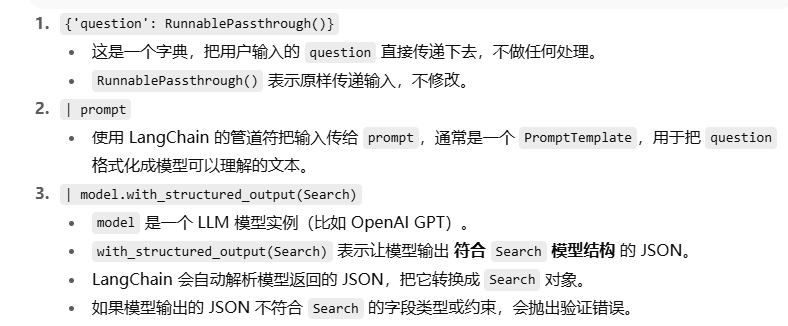
- publish_year: Optional[int]= Field(None, description='Year video was published')# 转换为对象给模型对象如下图解释
- chain ={'question': RunnablePassthrough()}| prompt | model.with_structured_output(Search)# resp1 = chain.invoke('how do I build a RAG agent?')# print(resp1)# resp2 = chain.invoke('videos on RAG published in 2023')# print(resp2)defretrieval(search: Search)-> List[Document]:
- _filter =Noneif search.publish_year:# 根据publish_year,存在得到一个检索条件# "$eq"是Chroma向量数据库的固定语法
- _filter ={'publish_year':{"$eq": search.publish_year}}return vectorstore.similarity_search(search.query,filter=_filter)
- new_chain = chain | retrieval
- # result = new_chain.invoke('videos on RAG published in 2023')
- result = new_chain.invoke('RAG tutorial')print([(doc.metadata['title'], doc.metadata['publish_year'])for doc in result])
十、提取结构化的数据
1、一句话提取出来-用户对象的信息
一句话,提出出来实体类
- import os
- from typing import Optional, List
- from langchain_core.prompts import ChatPromptTemplate
- from langchain_core.runnables import RunnablePassthrough
- from langchain_openai import ChatOpenAI
- from pydantic.v1 import BaseModel, Field
- os.environ['http_proxy']='127.0.0.1:7890'
- os.environ['https_proxy']='127.0.0.1:7890'
- os.environ["LANGCHAIN_TRACING_V2"]="true"
- os.environ["LANGCHAIN_PROJECT"]="LangchainDemo"
- os.environ["LANGCHAIN_API_KEY"]='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'# os.environ["TAVILY_API_KEY"] = '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'# 创建模型
- model = ChatOpenAI(model='gpt-4-turbo')# pydantic: 处理数据,验证数据, 定义数据的格式, 虚拟化和反虚拟化,类型转换等等。# 定义一个数据,classPerson(BaseModel):"""
- 关于一个人的数据模型
- """
- name: Optional[str]= Field(default=None, description='表示人的名字')
- hair_color: Optional[str]= Field(
- default=None, description="如果知道的话,这个人的头发颜色")
- height_in_meters: Optional[str]= Field(
- default=None, description="以米为单位测量的高度")classManyPerson(BaseModel):"""
- 数据模型类: 代表多个人
- """
- people: List[Person]# 定义自定义提示以提供指令和任何其他上下文。# 1) 你可以在提示模板中添加示例以提高提取质量# 2) 引入额外的参数以考虑上下文(例如,包括有关提取文本的文档的元数据。)
- prompt = ChatPromptTemplate.from_messages([("system","你是一个专业的提取算法。只从未结构化文本中提取相关信息。如果你不知道要提取的属性的值,返回该属性的值为null。",),# 请参阅有关如何使用参考记录消息历史的案例# MessagesPlaceholder('examples'),("human","{text}"),])# with_structured_output 模型的输出是一个结构化的数据
- chain ={'text': RunnablePassthrough()}| prompt | model.with_structured_output(schema=ManyPerson)# text = '马路上走来一个女生,长长的黑头发披在肩上,大概1米7左右,'# text = "马路上走来一个女生,长长的黑头发披在肩上,大概1米7左右。走在她旁边的是她的男朋友,叫:刘海;比她高10厘米。"
- text ="My name is Jeff, my hair is black and i am 6 feet tall. Anna has the same color hair as me."
- resp = chain.invoke(text)print(resp)
上面可能有英文的输出比如
解决:再加一个链路,让他翻译成中文 或者 修改系统提示词
- translate_prompt = ChatPromptTemplate.from_messages([("system","你是一个翻译算法,请把输入的结构化 JSON(英文字段)翻译为中文字段,并保持结构化。"),("human","{data}")])
- translate_chain =({"data": RunnablePassthrough()}| translate_prompt
- | model.with_structured_output(schema=ManyPersonZh))# 第二步:翻译并保持结构化
- translated = translate_chain.invoke(resp.dict())
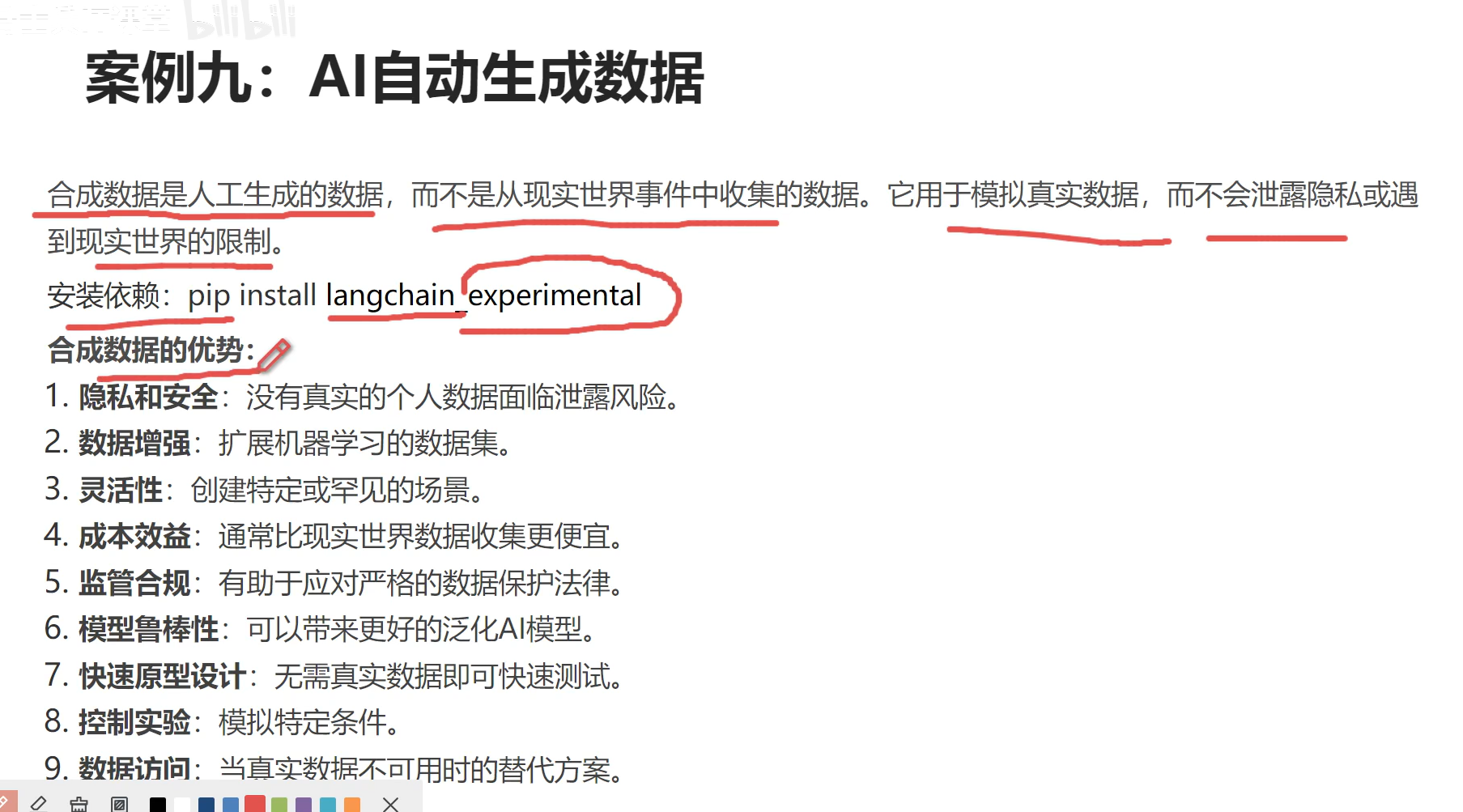
1、生成一些文本数据
- import os
- from langchain_experimental.synthetic_data import create_data_generation_chain
- from langchain_openai import ChatOpenAI
- os.environ['http_proxy']='127.0.0.1:7890'
- os.environ['https_proxy']='127.0.0.1:7890'
- os.environ["LANGCHAIN_TRACING_V2"]="true"
- os.environ["LANGCHAIN_PROJECT"]="LangchainDemo"
- os.environ["LANGCHAIN_API_KEY"]='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'# os.environ["TAVILY_API_KEY"] = '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'# 聊天机器人案例# 创建模型
- model = ChatOpenAI(model='gpt-3.5-turbo', temperature=0.8)# 创建链
- chain = create_data_generation_chain(model)# 生成数据# result = chain( # 给于一些关键词, 随机生成一句话# {# "fields": ['蓝色', '黄色'],# "preferences": {}# }# )
- result = chain(# 给于一些关键词, 随机生成一句话{"fields":{"颜色":['蓝色','黄色']},"preferences":{"style":"让它像诗歌一样。"}})print(result)
- import os
- from langchain_core.prompts import PromptTemplate, FewShotPromptTemplate
- from langchain_experimental.tabular_synthetic_data.openai import create_openai_data_generator
- from langchain_experimental.tabular_synthetic_data.prompts import SYNTHETIC_FEW_SHOT_PREFIX, SYNTHETIC_FEW_SHOT_SUFFIX
- from langchain_openai import ChatOpenAI
- from pydantic.v1 import BaseModel
- os.environ['http_proxy']='127.0.0.1:7890'
- os.environ['https_proxy']='127.0.0.1:7890'
- os.environ["LANGCHAIN_TRACING_V2"]="true"
- os.environ["LANGCHAIN_PROJECT"]="LangchainDemo"
- os.environ["LANGCHAIN_API_KEY"]='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'# os.environ["TAVILY_API_KEY"] = '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'# 创建模型
- model = ChatOpenAI(model='gpt-3.5-turbo', temperature=0.8)# 生成一些结构化的数据: 5个步骤# 1、定义数据模型classMedicalBilling(BaseModel):
- patient_id:int# 患者ID,整数类型
- patient_name:str# 患者姓名,字符串类型
- diagnosis_code:str# 诊断代码,字符串类型
- procedure_code:str# 程序代码,字符串类型
- total_charge:float# 总费用,浮点数类型
- insurance_claim_amount:float# 保险索赔金额,浮点数类型# 2、 提供一些样例数据,给AI
- examples =[{"example":"Patient ID: 123456, Patient Name: 张娜, Diagnosis Code: J20.9, Procedure Code: 99203, Total Charge: $500, Insurance Claim Amount: $350"},{"example":"Patient ID: 789012, Patient Name: 王兴鹏, Diagnosis Code: M54.5, Procedure Code: 99213, Total Charge: $150, Insurance Claim Amount: $120"},{"example":"Patient ID: 345678, Patient Name: 刘晓辉, Diagnosis Code: E11.9, Procedure Code: 99214, Total Charge: $300, Insurance Claim Amount: $250"},]# 3、创建一个提示模板, 用来指导AI生成符合规定的数据
- openai_template = PromptTemplate(input_variables=['example'], template="{example}")# subject主题是什么,extra额外的要求
- prompt_template = FewShotPromptTemplate(
- prefix=SYNTHETIC_FEW_SHOT_PREFIX,
- suffix=SYNTHETIC_FEW_SHOT_SUFFIX,
- examples=examples,
- example_prompt=openai_template,
- input_variables=['subject','extra'])# 4、创建一个结构化数据的生成器
- generator = create_openai_data_generator(
- output_schema=MedicalBilling,# 指定输出数据的格式
- llm=model,
- prompt=prompt_template
- )# 5、调用生成器
- result = generator.generate(
- subject='医疗账单',# 指定生成数据的主题
- extra='医疗总费用呈现正态分布,最小的总费用为1000',# 额外的一些指导信息
- runs=10# 指定生成数据的数量)print(result)
因为回答不能上一次是情感分类,下一次就进入了新闻分类,要固定
- import os
- from langchain_core.prompts import PromptTemplate, FewShotPromptTemplate, ChatPromptTemplate
- from langchain_experimental.synthetic_data import create_data_generation_chain
- from langchain_experimental.tabular_synthetic_data.openai import create_openai_data_generator
- from langchain_experimental.tabular_synthetic_data.prompts import SYNTHETIC_FEW_SHOT_PREFIX, SYNTHETIC_FEW_SHOT_SUFFIX
- from langchain_openai import ChatOpenAI
- from pydantic.v1 import BaseModel, Field
- os.environ['http_proxy']='127.0.0.1:7890'
- os.environ['https_proxy']='127.0.0.1:7890'
- os.environ["LANGCHAIN_TRACING_V2"]="true"
- os.environ["LANGCHAIN_PROJECT"]="LangchainDemo"
- os.environ["LANGCHAIN_API_KEY"]='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'# os.environ["TAVILY_API_KEY"] = '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'# 创建模型 temperature是0-1,随机性语言太多了,所以我们就要他直接输出少多样化回复
- model = ChatOpenAI(model='gpt-3.5-turbo', temperature=0)# class Classification(BaseModel):# """# 定义一个Pydantic的数据模型,未来需要根据该类型,完成文本的分类# """# # 文本的情感倾向,预期为字符串类型# sentiment: str = Field(description="文本的情感")## # 文本的攻击性,预期为1到10的整数# aggressiveness: int = Field(# description="描述文本的攻击性,数字越大表示越攻击性"# )## # 文本使用的语言,预期为字符串类型# language: str = Field(description="文本使用的语言")classClassification(BaseModel):"""
- 定义一个Pydantic的数据模型,未来需要根据该类型,完成文本的分类
- """# 文本的情感倾向,预期为字符串类型
- sentiment:str= Field(..., enum=["happy","neutral","sad"], description="文本的情感")# 文本的攻击性,预期为1到5的整数
- aggressiveness:int= Field(..., enum=[1,2,3,4,5], description="描述文本的攻击性,数字越大表示越攻击性")# 文本使用的语言,预期为字符串类型
- language:str= Field(..., enum=["spanish","english","french","中文","italian"], description="文本使用的语言")# 创建一个用于提取信息的提示模板
- tagging_prompt = ChatPromptTemplate.from_template("""
- 从以下段落中提取所需信息。
- 只提取'Classification'类中提到的属性。
- 段落:
- {input}
- """)
- chain = tagging_prompt | model.with_structured_output(Classification)
- input_text ="中国人民大学的王教授:师德败坏,做出的事情实在让我生气!"# input_text = "Estoy increiblemente contento de haberte conocido! Creo que seremos muy buenos amigos!"
- result: Classification = chain.invoke({'input': input_text})print(result)
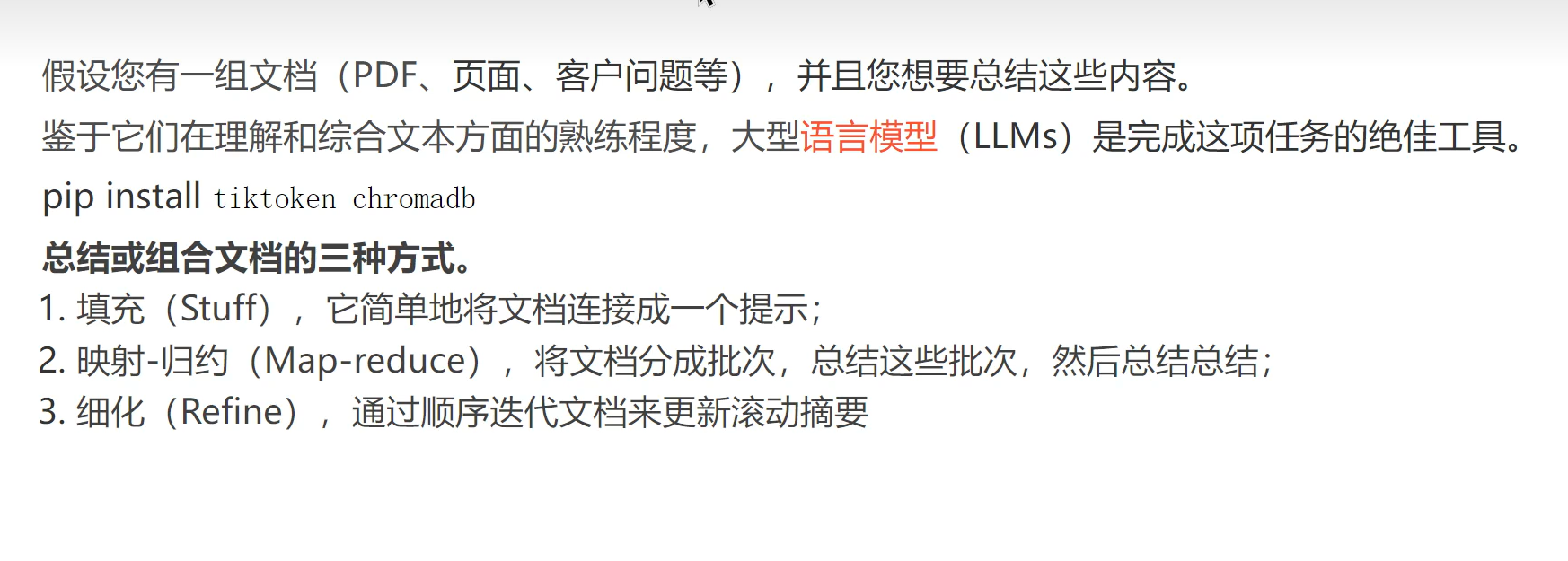
用的最多的还是前两种
1、Stuff使用
Stuff只能解决小文档片段,超过了一次性的token就不行
- import os
- from langchain.chains.combine_documents.stuff import StuffDocumentsChain
- from langchain.chains.llm import LLMChain
- from langchain_community.document_loaders import WebBaseLoader
- from langchain_core.prompts import PromptTemplate
- from langchain_openai import ChatOpenAI
- os.environ['http_proxy']='127.0.0.1:7890'
- os.environ['https_proxy']='127.0.0.1:7890'
- os.environ["LANGCHAIN_TRACING_V2"]="true"
- os.environ["LANGCHAIN_PROJECT"]="LangchainDemo"
- os.environ["LANGCHAIN_API_KEY"]='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'# 创建模型
- model = ChatOpenAI(model='gpt-3.5-turbo', temperature=0)# 加载我们的文档。我们将使用 WebBaseLoader 来加载博客文章:
- loader = WebBaseLoader('https://lilianweng.github.io/posts/2023-06-23-agent/')
- docs = loader.load()# 得到整篇文章# 第一种: Stuff# Stuff的第一种写法(使用的不多)# chain = load_summarize_chain(model, chain_type='stuff')# result = chain.invoke(docs)# print(result['output_text'])# Stuff的第二种写法# 定义提示
- prompt_template ="""针对下面的内容,写一个简洁的总结摘要:
- "{text}"
- 简洁的总结摘要:"""
- prompt = PromptTemplate.from_template(prompt_template)# model和prompt关联
- llm_chain = LLMChain(llm=model, prompt=prompt)
- stuff_chain = StuffDocumentsChain(llm_chain=llm_chain, document_variable_name='text')
- result = stuff_chain.invoke(docs)print(result['output_text'])
MapReduce:当出现文本时文章,字数比较多,超过了最大token限制,可以使用这个方法
案例
假设文本50万字,切割5000字一份,每一份有500字,每个500字都交给大模型,然后得到小段落结论摘要s1,很多个s。
问题:小段落结论摘要又有很多不能一次性丢给ai ,假设小段落有5000个小摘要,ai最多接受1000字
可以再进行一次摘要提取,得到ss,然后ss再进行获取总摘要,再多的循环类推直到解决。- import os
- from langchain.chains.combine_documents.map_reduce import MapReduceDocumentsChain
- from langchain.chains.combine_documents.reduceimport ReduceDocumentsChain
- from langchain.chains.combine_documents.stuff import StuffDocumentsChain
- from langchain.chains.llm import LLMChain
- from langchain_community.document_loaders import WebBaseLoader
- from langchain_core.prompts import PromptTemplate
- from langchain_openai import ChatOpenAI
- from langchain_text_splitters import CharacterTextSplitter
- os.environ['http_proxy']='127.0.0.1:7890'
- os.environ['https_proxy']='127.0.0.1:7890'
- os.environ["LANGCHAIN_TRACING_V2"]="true"
- os.environ["LANGCHAIN_PROJECT"]="LangchainDemo"
- os.environ["LANGCHAIN_API_KEY"]='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'# 创建模型
- model = ChatOpenAI(model='gpt-3.5-turbo', temperature=0)# 加载我们的文档。我们将使用 WebBaseLoader 来加载博客文章:
- loader = WebBaseLoader('https://lilianweng.github.io/posts/2023-06-23-agent/')
- docs = loader.load()# 得到整篇文章# 第二种: Map-Reduce# 第一步: 切割阶段# 每一个小docs为1000个token
- text_splitter = CharacterTextSplitter.from_tiktoken_encoder(chunk_size=1000, chunk_overlap=0)
- split_docs = text_splitter.split_documents(docs)# 第二步: map阶段
- map_template ="""以下是一组文档(documents)
- "{docs}"
- 根据这个文档列表,请给出总结摘要:"""
- map_prompt = PromptTemplate.from_template(map_template)
- map_llm_chain = LLMChain(llm=model, prompt=map_prompt)# 第三步: reduce阶段: (combine和 最终的reduce)
- reduce_template ="""以下是一组总结摘要:
- {docs}
- 将这些内容提炼成一个最终的、统一的总结摘要:"""
- reduce_prompt = PromptTemplate.from_template(reduce_template)
- reduce_llm_chain = LLMChain(llm=model, prompt=reduce_prompt)'''
- reduce的思路:
- 如果map之后文档的累积token数超过了 4000个,那么我们将递归地将文档以<= 4000 个token的批次传递给我们的 StuffDocumentsChain 来创建批量摘要。
- 一旦这些批量摘要的累积大小小于 4000 个token,我们将它们全部传递给 StuffDocumentsChain 最后一次,以创建最终摘要。
- '''# 定义一个combine的chain
- combine_chain = StuffDocumentsChain(llm_chain=reduce_llm_chain, document_variable_name='docs')
- reduce_chain = ReduceDocumentsChain(# 这是最终调用的链。
- combine_documents_chain=combine_chain,# 中间的汇总的脸
- collapse_documents_chain=combine_chain,# 将文档分组的最大令牌数。
- token_max=4000)# 第四步:合并所有链
- map_reduce_chain = MapReduceDocumentsChain(
- llm_chain=map_llm_chain,
- reduce_documents_chain=reduce_chain,
- document_variable_name='docs',
- return_intermediate_steps=False#是否打印中间的汇总)# 第五步: 调用最终的链
- result = map_reduce_chain.invoke(split_docs)print(result['output_text'])
文档链通过循环遍历输入文档并逐步更新其答案来构建响应。对于每个文档,它将当前文档和最新的中间答案传递给LLM链,以获得新的答案。 性能慢
拆分5000份,然后再得到第一个摘要s,和拆分5000份的第二份,进行摘要,依此类推- import os
- from langchain.chains.summarize import load_summarize_chain
- from langchain_community.document_loaders import WebBaseLoader
- from langchain_openai import ChatOpenAI
- from langchain_text_splitters import CharacterTextSplitter
- os.environ['http_proxy']='127.0.0.1:7890'
- os.environ['https_proxy']='127.0.0.1:7890'
- os.environ["LANGCHAIN_TRACING_V2"]="true"
- os.environ["LANGCHAIN_PROJECT"]="LangchainDemo"
- os.environ["LANGCHAIN_API_KEY"]='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'# os.environ["TAVILY_API_KEY"] = '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'# 创建模型
- model = ChatOpenAI(model='gpt-3.5-turbo', temperature=0)# 加载我们的文档。我们将使用 WebBaseLoader 来加载博客文章:
- loader = WebBaseLoader('https://lilianweng.github.io/posts/2023-06-23-agent/')
- docs = loader.load()# 得到整篇文章# 第三种: Refine'''
- Refine: RefineDocumentsChain 类似于map-reduce:
- 文档链通过循环遍历输入文档并逐步更新其答案来构建响应。对于每个文档,它将当前文档和最新的中间答案传递给LLM链,以获得新的答案。
- '''# 第一步: 切割阶段# 每一个小docs为1000个token
- text_splitter = CharacterTextSplitter.from_tiktoken_encoder(chunk_size=1000, chunk_overlap=0)
- split_docs = text_splitter.split_documents(docs)# 指定chain_type为: refine
- chain = load_summarize_chain(model, chain_type='refine')
- result = chain.invoke(split_docs)print(result['output_text'])
- import os
- from langchain.chains.summarize import load_summarize_chain
- from langchain_community.document_loaders import WebBaseLoader
- from langchain_core.prompts import PromptTemplate
- from langchain_openai import ChatOpenAI
- from langchain_text_splitters import CharacterTextSplitter
- os.environ['http_proxy']='127.0.0.1:7890'
- os.environ['https_proxy']='127.0.0.1:7890'
- os.environ["LANGCHAIN_TRACING_V2"]="true"
- os.environ["LANGCHAIN_PROJECT"]="LangchainDemo"
- os.environ["LANGCHAIN_API_KEY"]='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'# os.environ["TAVILY_API_KEY"] = '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'# 创建模型
- model = ChatOpenAI(model='gpt-3.5-turbo', temperature=0)# 首先我们加载我们的文档。我们将使用 WebBaseLoader 来加载博客文章:
- loader = WebBaseLoader("https://lilianweng.github.io/posts/2023-06-23-agent/")
- docs = loader.load()# 没有切割的'''
- Refine: RefineDocumentsChain 类似于映射-归约:
- 细化文档链通过循环遍历输入文档并逐步更新其答案来构建响应。对于每个文档,它将当前文档和最新的中间答案传递给LLM链,以获得新的答案。
- '''# 定义提示
- prompt_template ="""针对下面的内容,写一个简洁的总结摘要:
- "{text}"
- 简洁的总结摘要:"""
- prompt = PromptTemplate.from_template(prompt_template)
- refine_template =("Your job is to produce a final summary\n""We have provided an existing summary up to a certain point: {existing_answer}\n""We have the opportunity to refine the existing summary""(only if needed) with some more context below.\n""------------\n""{text}\n""------------\n""\n""Given the new context, refine the original summary in Chinese""If the context isn't useful, return the original summary.")# refine_template = (# "你的工作是做出一个最终的总结摘要。\n"# "我们提供了一个到某个点的现有摘要:{existing_answer}\n"# "我们有机会完善现有的摘要,基于下面更多的文本内容\n"# "------------\n"# "{text}\n"# "------------\n"# )
- refine_prompt = PromptTemplate.from_template(refine_template)
- chain = load_summarize_chain(
- llm=model,
- chain_type="refine",
- question_prompt=prompt,
- refine_prompt=refine_prompt,
- return_intermediate_steps=False,
- input_key="input_documents",
- output_key="output_text",)
- text_splitter = CharacterTextSplitter.from_tiktoken_encoder(
- chunk_size=1000, chunk_overlap=0)
- split_docs = text_splitter.split_documents(docs)
- result = chain.invoke({"input_documents": split_docs}, return_only_outputs=True)print(result["output_text"])
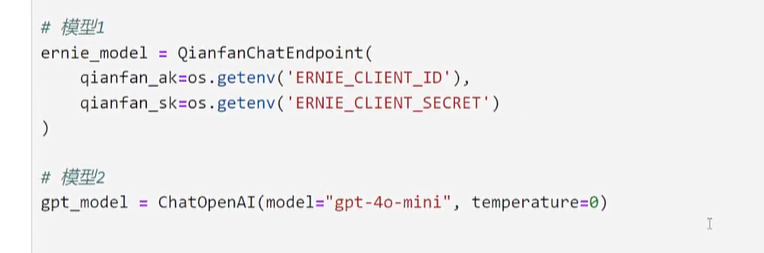
1、定义模型
2、模型配置
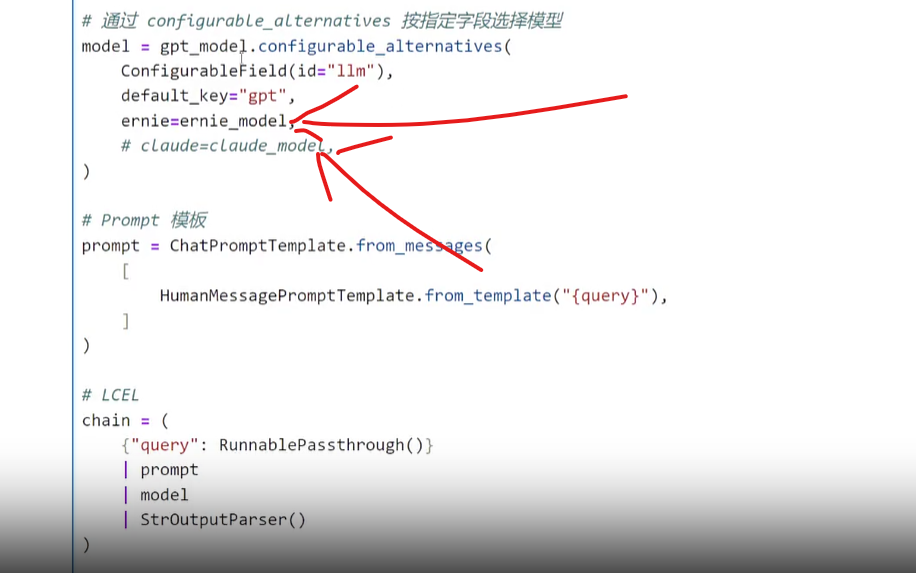
下图画线的是模型,然后图中的key作为你要选用的模型去进行调用看完3你就明白了,gpt是默认的一个模型
3、跟据配置id和对应的key选择模型使用
图中llm是文件id,ernie是你定义模型key,也可改为gpt
十五、ReAct(选择工具,然后思考)
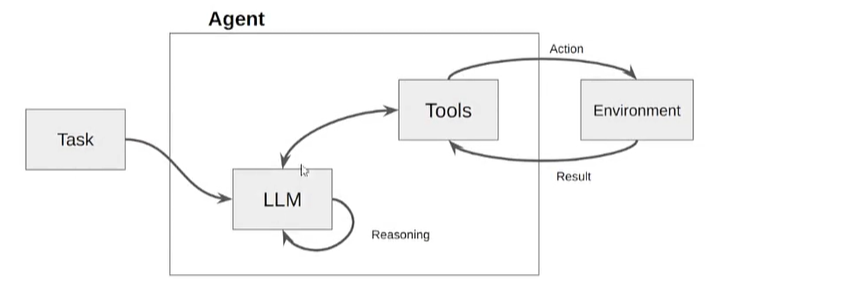
一、流程图
将一个任务拆分,多次进行调用工具思考,然后最终完成大的任务的一个流程
二、demo
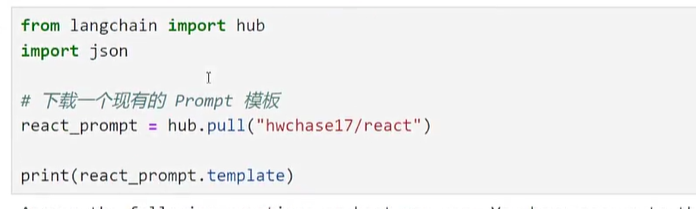
这是一个简单的demo,大概就是拉一个模板下来,然后进行调用
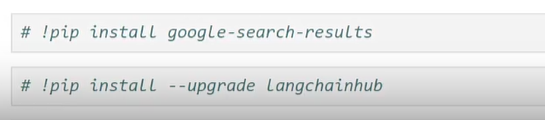
安装
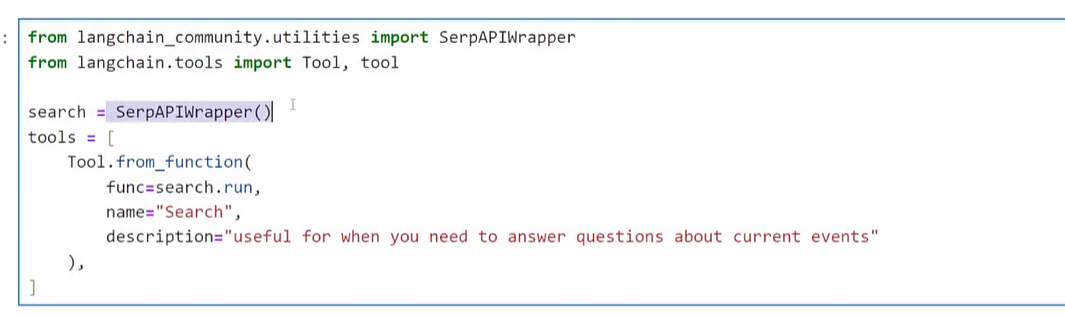
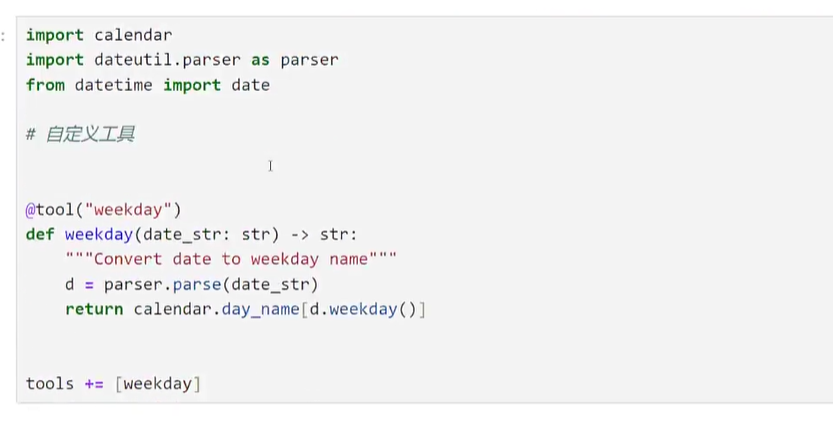
定义两个工具
拉下来模板
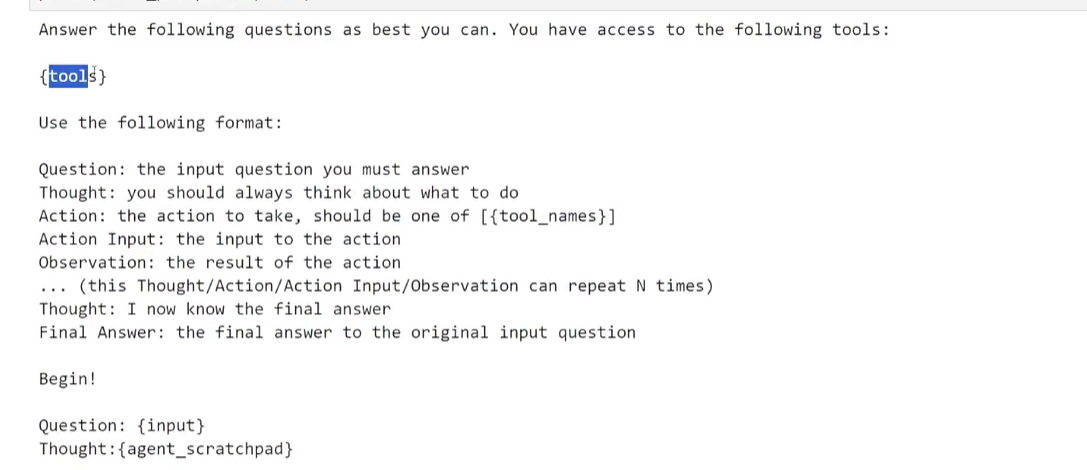
模板解读,大概就是有哪些工具,循环然后获取结果然后进行调用工具,解决这个问题
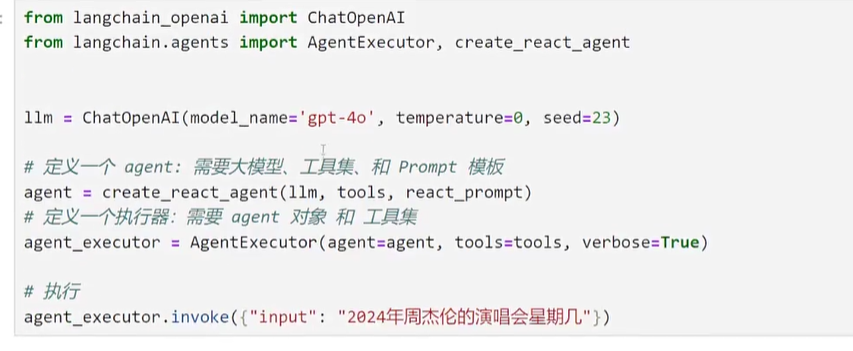
调用
其中agent_executor会进行执行工具然后再反复执行,直到结束
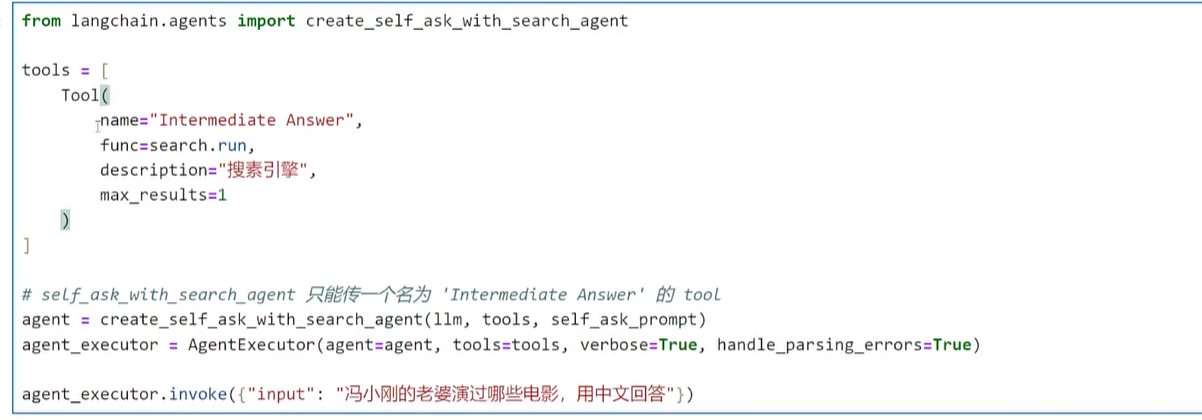
十六、SelfAskWithSearch(只用一个工具搜索,然后不断的反问)
比如问一个问题,就是xxx老婆是谁,演过什么电影,然后不断搜索直到出来结果
案例
后续、后续课程的笔记
换到下一篇章博文
原文地址:https://blog.csdn.net/weixin_49390750/article/details/151353838 |














 广告
广告