开启左侧

本地部署 langchain-ChatGLM

[复制链接]
wsgn_001 发表于 昨天 17:14 | 显示全部楼层 |阅读模式 打印 上一主题 下一主题
作者:CSDN博客
本地部署 langchain-ChatGLM

    1. 什么是 langchain-ChatGLM2. 什么是 langchain3. Github 地址4. 安装 Miniconda35. 创建虚拟环境6. 部署 langchain-ChatGLM7. 启动 langchain-ChatGLM8. 访问 langchain-ChatGLM9. API部署10. 命令行部署11. 其他,LangChain Document Loaders

1. 什么是 langchain-ChatGLM

一种利用 ChatGLM-6B + langchain 实现的基于本地知识的 ChatGLM 应用。增加 clue-ai/ChatYuan 项目的模型 ClueAI/ChatYuan-large-v2 的支持。
本项目中 Embedding 默认选用的是 GanymedeNil/text2vec-large-chinese,LLM 默认选用的是 ChatGLM-6B。依托上述模型,本项目可实现全部使用开源模型离线私有部署。
2. 什么是 langchain

大型语言模型(LLM)正在成为一种变革性的技术,使开发者能够建立他们以前无法建立的应用程序。然而,孤立地使用这些LLM往往不足以创建一个真正强大的应用程序–当你能将它们与其他计算或知识来源相结合时,真正的力量才会出现。这个库的目的是协助开发这些类型的应用。
langchain 使用 Transformer 模型,并在多个语言间建立链式结构实现翻译。比如,它可以通过英语→法语→西班牙语完成英语到西班牙语的翻译。
langchain 只使用公开数据集进行训练,不需要额外的数据。它使用的训练集包括:
    WMT2014英法翻译数据集WMT2014英德翻译数据集UN翻译语料库
langchain 提供11种语言的机器翻译模型,语言包括:英语、法语、西班牙语、意大利语、德语、荷兰语、葡萄牙语、俄语、日语、中文、阿拉伯语。
langchain的参数量较小,其基础模型只有 47M 参数,加快推理速度并降低计算资源要求。
langchain开源免费,模型与代码都在 GitHub 开源,方便研究与生产使用。
3. Github 地址

https://github.com/imClumsyPanda/langchain-ChatGLM
https://github.com/hwchase17/langchain
4. 安装 Miniconda3

下载 Conda 安装脚本,
  1. wget https://repo.anaconda.com/miniconda/Miniconda3-latest-Linux-x86_64.sh
复制代码
运行安装脚本,
  1. bash Miniconda3-latest-Linux-x86_64.sh
复制代码
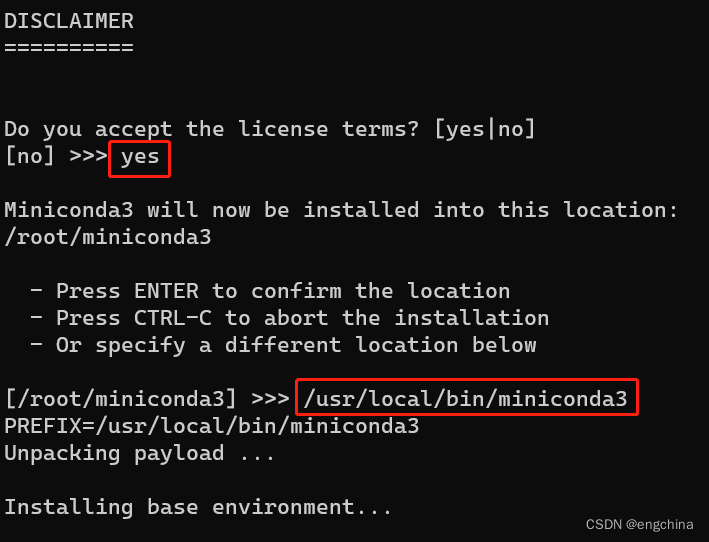
按提示操作。当提示是否初始化 Conda 时,输入 “yes”,
本地部署 langchain-ChatGLM-1.png


安装完成后,关闭当前终端并打开新终端,这将激活 Conda,
  1. sudo su - root
复制代码
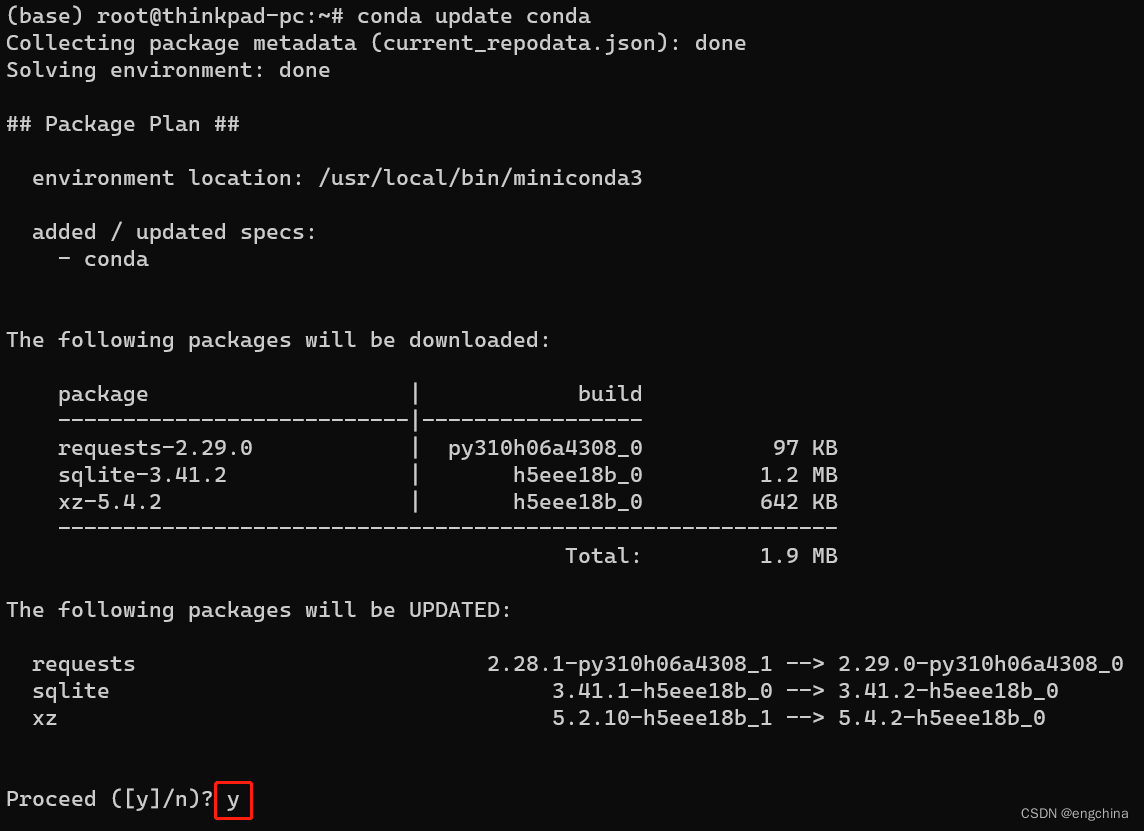
更新 Conda 至最新版本,
  1. conda update conda
复制代码
本地部署 langchain-ChatGLM-2.png

本地部署 langchain-ChatGLM-3.png


添加必要的 Conda 通道以获取更多软件包,
  1. conda config --add channels conda-forge
  2. conda config --add channels defaults
复制代码
测试是否安装成功,
  1. conda list
复制代码
如果显示 Conda 及其内部包的列表,则说明安装成功。
5. 创建虚拟环境
  1. conda create -n langchain-chatglm python==3.10.4
  2. conda activate langchain-chatglm
复制代码
6. 部署 langchain-ChatGLM
  1. git clone https://github.com/imClumsyPanda/langchain-ChatGLM; cd langchain-ChatGLM
  2. pip3 install -r requirements.txt
  3. pip3 install -U gradio
  4. pip3 install modelscope
复制代码
7. 启动 langchain-ChatGLM
  1. python webui.py
复制代码
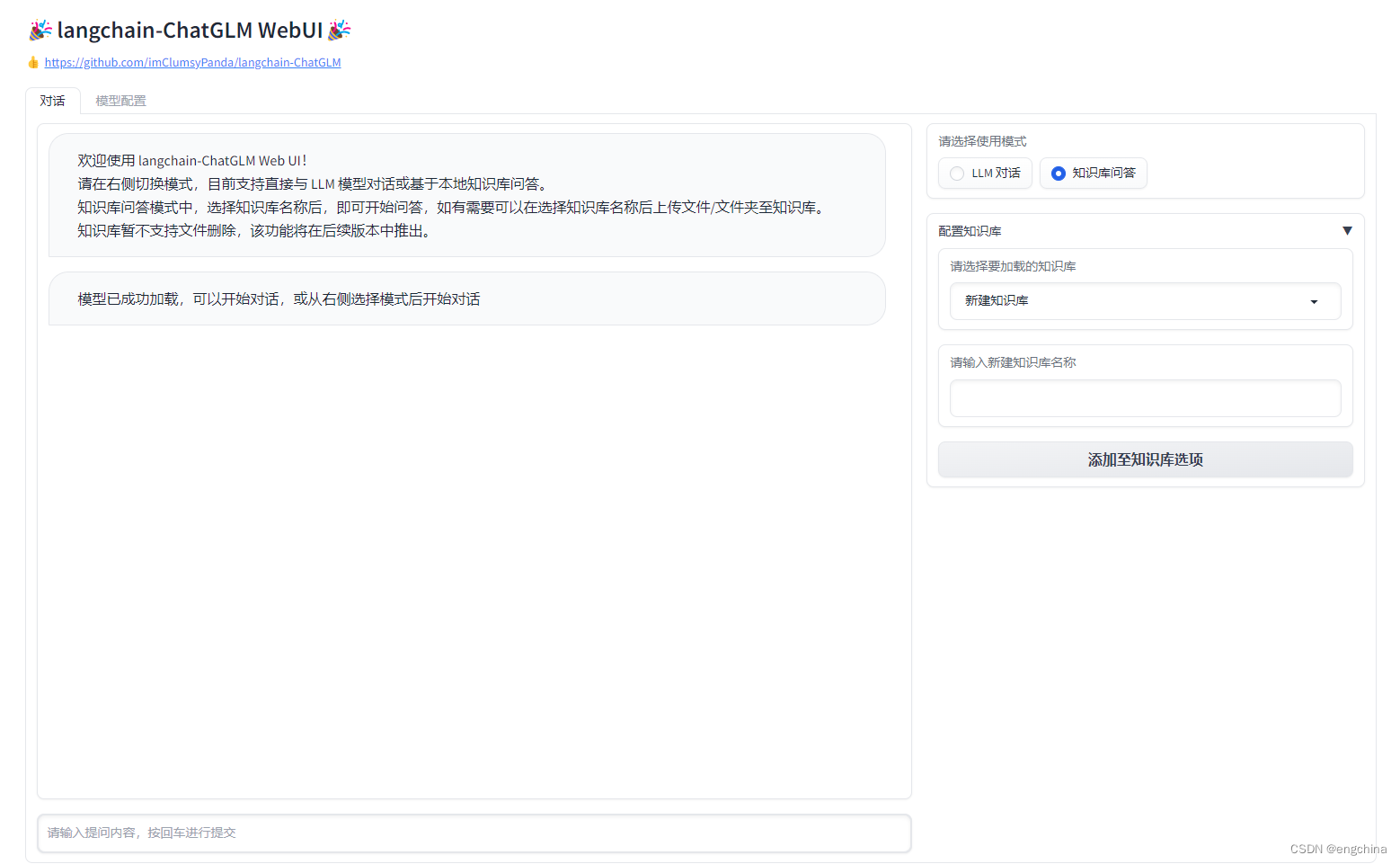
8. 访问 langchain-ChatGLM

使用浏览器打开 http://localhost:7860/,
本地部署 langchain-ChatGLM-4.png

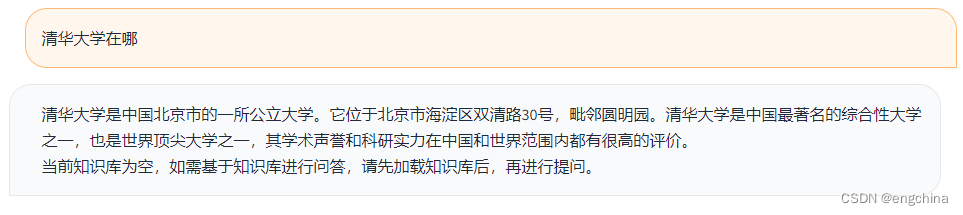
问它一个问题,清华大学在哪?
本地部署 langchain-ChatGLM-5.png


9. API部署
  1. python api.py
复制代码
10. 命令行部署
  1. python cli_demo.py
复制代码
11. 其他,LangChain Document Loaders

refer: https://python.langchain.com/en/latest/modules/indexes/document_loaders.html
将语言模型与你自己的文本数据结合起来是一个强有力的方法。做到这一点的第一步是将数据加载到 "文档 "中 – 即一些文本片段。这个模块的目的是使之变得简单。
这方面的一个主要驱动是 Unstructured python 包。这个包是将所有类型的文件 – 文本、powerpoint、图片、html、pdf等–转化为文本数据的好方法。
完结!

原文地址:https://blog.csdn.net/engchina/article/details/130530837
回复

使用道具 举报

您需要登录后才可以回帖 登录 | 立即注册

本版积分规则

发布主题
阅读排行更多+

Powered by Discuz! X3.4© 2001-2013 Discuz Team.( 京ICP备17022993号-3 )